Power consumption of a local GB10 AI: our mesures
At idle, the GPU in our AI TOP ATOM draws 10.4 W. Under load, it draws 39 to 53 W on average, with peaks up to 95 W. A private assistant response uses 0.15 Wh, or 0.003 euro cents; a full LoRA training run uses 76.7 Wh, or 1.5 euro cents. These figures cover the GPU alone, read from the chip, during our per-task measurements from October 6 to 8, 2026; a continuous 30-day reading is in progress.
How much electricity does an AI running at home use? We recorded the GPU power draw of our AI TOP ATOM (NVIDIA GB10 chip, 128 GB), generously provided by GIGABYTE, during typical tasks, then continuously since the evening of October 6, 2026. These figures cover the GPU only, read from the chip, so treat them as indicative. This page will be updated when the 30-day recording ends.
#What exactly are we measuring?
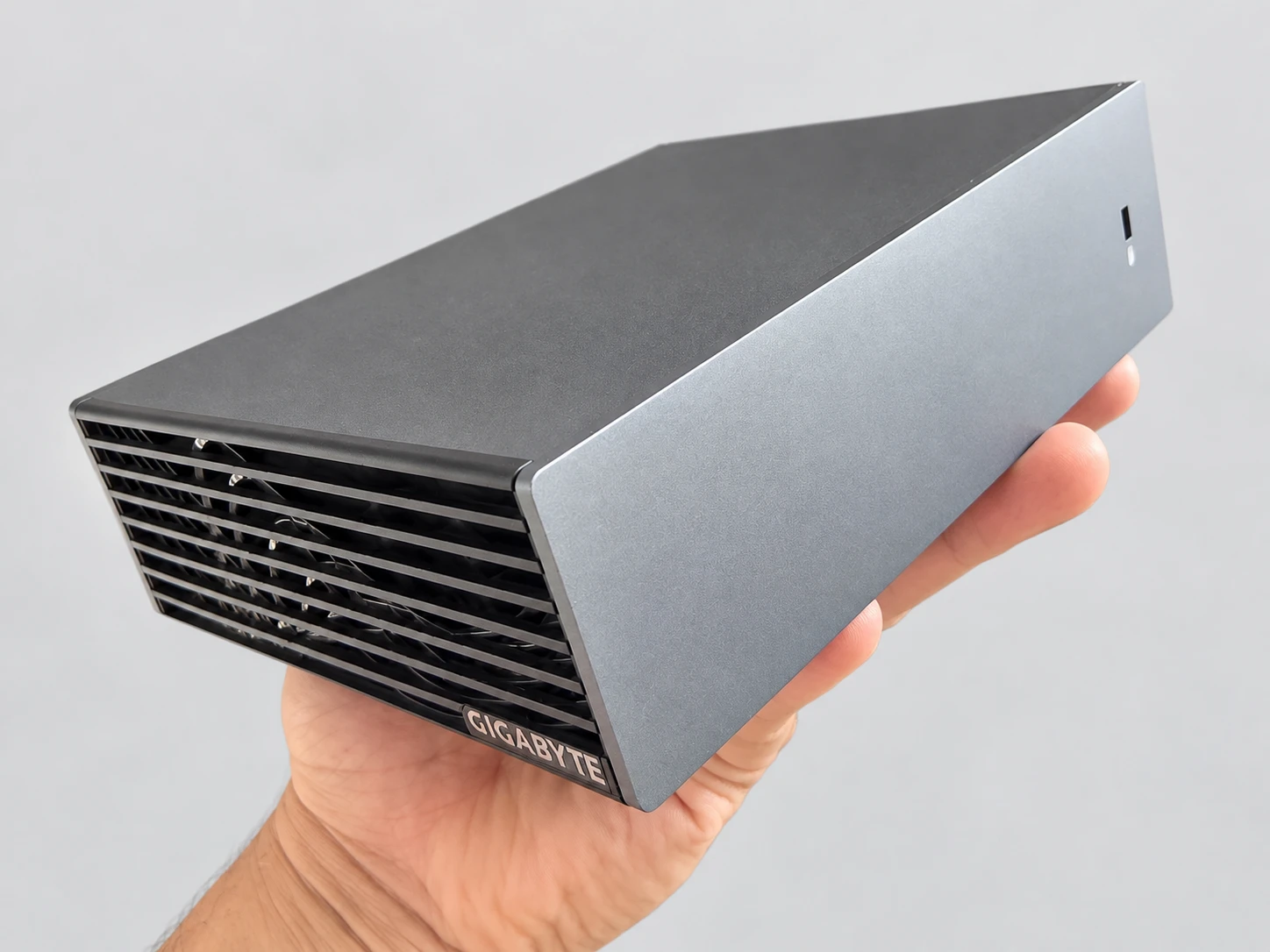
This guide covers the GPU power of the GB10 chip, as reported by the chip itself. We read it with nvidia-smi, the NVIDIA tool: one reading per second during each task, then one reading every 10 seconds for the continuous log. NVIDIA specifies that this value represents the GPU only.
The measurements describe GPU power as reported by the chip. The CPU, memory, SSD, network, fans, and power supply losses are not counted.
The continuous 30-day logging run is in progress: it started on October 6, 2026 at 23:46. This page covers its first few days. It will be updated when the run ends, scheduled for November 5, 2026, and each update will be dated.
#How do you read watts, watt-hours, and euros?
Power is measured in watts (W): it is what the GPU draws at a given moment. Energy is measured in watt-hours (Wh): it is power multiplied by time. 1000 Wh make 1 kWh, the unit on your electricity bill. For example, 50 W for 2 hours makes 100 Wh. Memory sizes are in GB (1 GB = 1024 MB, as Linux displays it).
The rate is that of EDF's regulated Tarif Bleu plan, Base option, 6 kVA: 20.01 euro cents per kWh including tax, according to the rate schedule in effect on August 1, 2026. The subscription fee isn't counted for the ATOM, since you'd pay it without it. Your contract may have a different price.
The machine is a GIGABYTE AI TOP ATOM (128 GB of memory, NVIDIA GB10 chip, DGX OS 7.5.0). The per-task readings come from our test runs from October 6 to 8, 2026. We locked our protocol before the first measurement; the method and the data behind our tables are published on our methodology page.
#How much power does the GPU draw at idle?
At idle, with no tasks running, over 30 minutes, the GPU draws an average of 10.4 W, ranging from 10.2 to 11.0 W. That's roughly the power of a living-room LED bulb.
Over 24 hours, 10.4 W comes to 0.25 kWh, or 5 euro cents of electricity. Over 30 days, that's 7.5 kWh, or €1.50. These figures count the GPU only.
#How much power does the GPU draw under load?
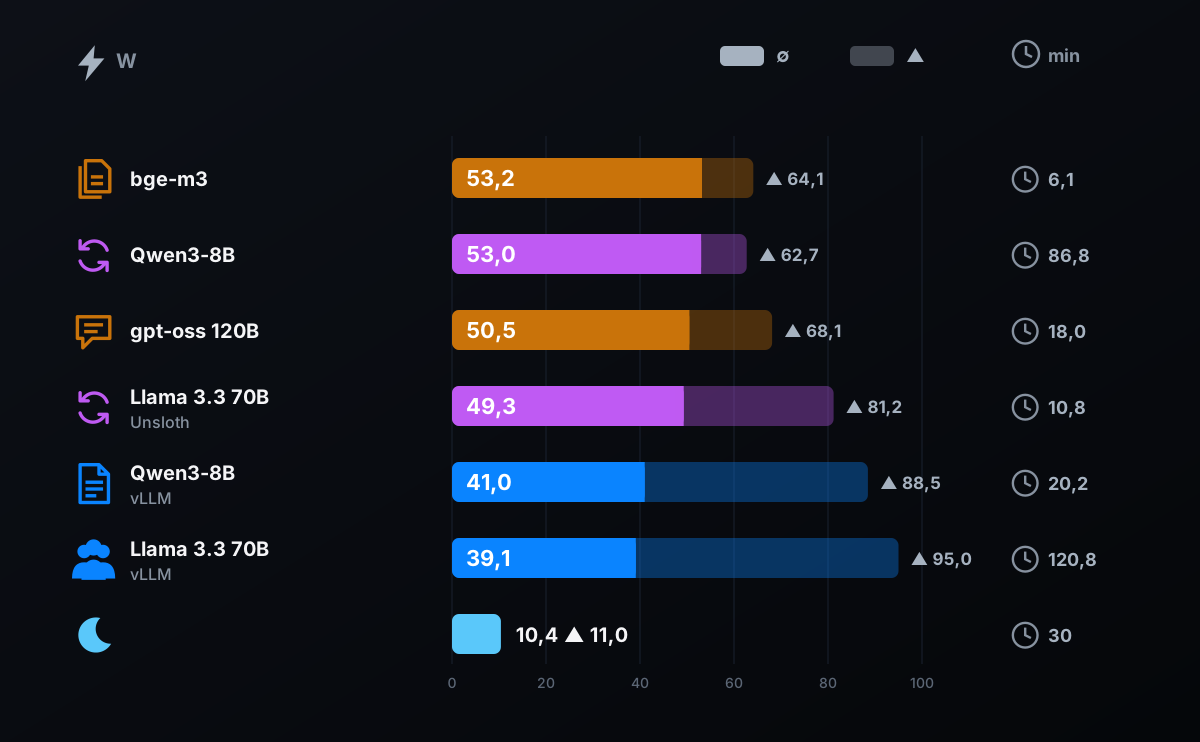
We logged GPU power during six typical tasks, with idle as the baseline: a private assistant answering questions about documents, indexing those documents, LoRA training, QLoRA training, reading 200 invoices, and a 2-hour service session for 8 users.
| Situation | Duration | Average power | Pointe | Energy |
|---|---|---|---|---|
| Idle, no tasks | 30 min | 10,4 W | 11,0 W | — |
| Private assistant: 100 responses, 4 in parallel, 500-page knowledge base | 18.0 min | 50,5 W | 68,1 W | 15.2 Wh |
| Private assistant: 100 answers, 5,000-page knowledge base | 18.2 min | 50,7 W | 66,8 W | 15.4 Wh |
| Indexing 5,000 pages (701 files) | 6.1 min | 53,2 W | 64,1 W | 5.4 Wh |
| LoRA training on invoices (Qwen3-8B, 500 steps, or 85 min of training) | 86.8 min | 53,0 W | 62,7 W | 76.7 Wh |
| Reading 200 invoices, twice: base model (7.7 Wh), then trained model (6.1 Wh) | 20.2 min | 41,0 W | 88,5 W | 13.8 Wh |
| 2-hour serving: Llama 3.3 70B NVFP4, 8 concurrent users (vLLM) | 120.8 min | 39,1 W | 95,0 W | 78.8 Wh |
| QLoRA of Llama 3.3 70B (Unsloth, including loading) | 10.8 min | 49,3 W | 81,2 W | 8.9 Wh |
Under load, average GPU power ranges from 39.1 W (the 2-hour serving run) to 53.2 W (indexing 5,000 pages). The size of the document base makes almost no difference: 50.5 W with 500 pages, 50.7 W with 5,000 pages. Peaks stay below 100 W: 95.0 W at most, during the 2-hour serving run.
A 70-billion-parameter model serving eight people draws less power (39.1 W) than indexing or training (53 W). We didn't measure the cause. One possible explanation: this serving workload spends most of its time reading memory rather than computing, which puts less load on the GPU.
#How much energy and money per task?
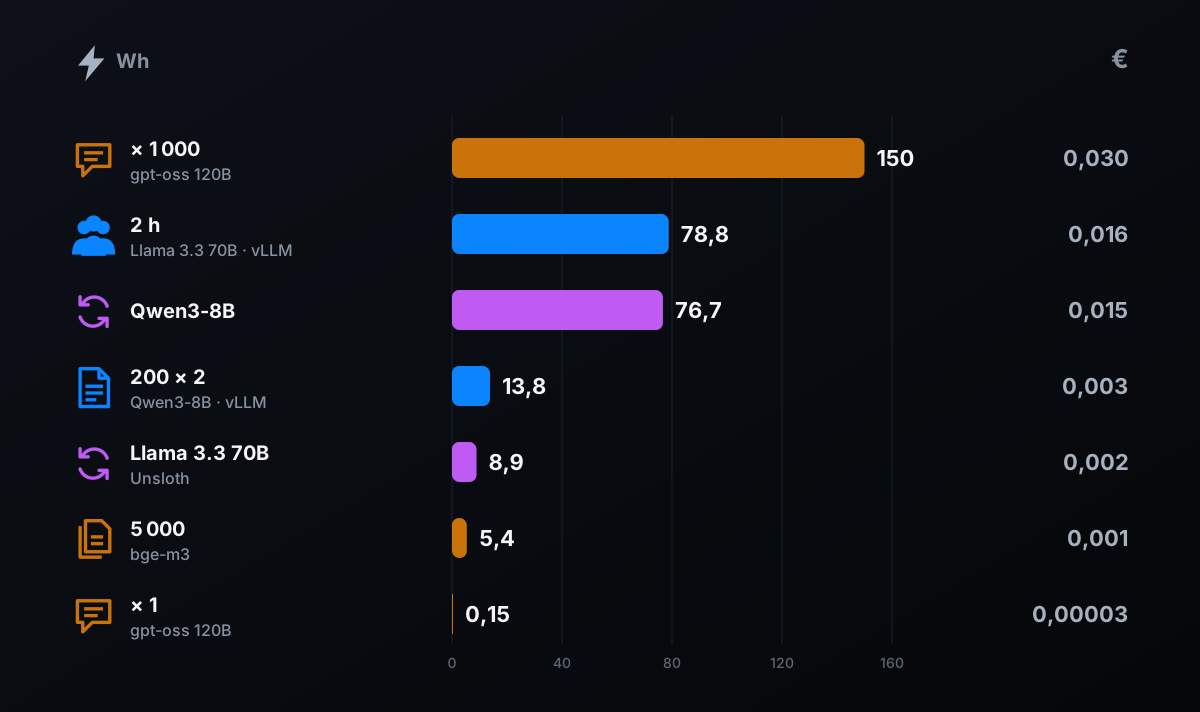
A task's energy is its average power multiplied by its duration. The cost is based on the EDF rate of 20.01 euro cents per kWh. The table and chart show the result for each task, GPU only.
| Task | GPU energy | Cost |
|---|---|---|
| One private assistant response | 0.15 Wh | 0.003 euro cents |
| 1,000 private assistant responses | 150 Wh (0.15 kWh) | 3 cents |
| Indexing 5,000 pages | 5.4 Wh | 0.11 euro cents |
| QLoRA of Llama 3.3 70B | 8.9 Wh | 0.18 euro cents |
| Reading 200 invoices, twice | 13.8 Wh | 0.28 euro cents |
| LoRA training (85 min of steps, 86.8 min of logging) | 76.7 Wh | 1.5 euro cents |
| 2-hour serving for 8 users | 78.8 Wh | 1.6 euro cents |
| Idle for 24 h | 250 Wh (0.25 kWh) | 5 cents |
A private assistant response uses 0.15 Wh, measured with 4 questions processed in parallel: 0.003 euro cents. A thousand responses cost 3 cents. At 1,000 responses every day for a year, the energy for the responses alone would come to about €11. A year of GPU idle time (a constant 10.4 W, or 91 kWh) costs about €18. A full 85-minute training run costs 1.5 cents, and two hours of serving eight people costs 1.6 cents.
To put these amounts in perspective, on October 8, 2026, the AI TOP ATOM was listed at €6,346.27 (model 9001, official AORUS store) and €7,999.95 (model 9000, LDLC). GB10 prices change every week, but the order of magnitude is clear: GPU electricity costs very little compared with the purchase price. Even counting the whole machine, electricity stays modest: at a constant 36.5 W, the idle power ServeTheHome measured at the wall, a month costs about €5.
#How do you estimate your own bill?
Your usage isn't ours. Here's a four-step method, with two examples calculated from our measurements. These are calculations, not measurements, and they only count the GPU.
- 01Break the month into tasks and idle timeWrite down how many hours per month the machine is working, and on which task. The rest of the time, it's idle.
- 02Take the average power of each taskUse the table in the load section: 39.1 W for serving 8 people, 50.5 W for a private assistant, 53.0 W for training, 10.4 W at idle.
- 03Calculate the energyMultiply the power in W by the hours to get Wh. Add up the tasks and idle time.
- 04Convert to eurosDivide by 1,000 to get kWh, then multiply by €0.2001 (the rate used on this page) or by your plan's price. Add the share for the rest of the machine, which only a wall-outlet measurement can give you.
Example 1, a small team. Eight people continuously use a 70-billion-parameter model for 2 hours per business day, 22 days per month. The machine sits idle the rest of the time, i.e., 720 h minus 44 h. Serving: 78.8 Wh × 22 = 1,734 Wh. Idle: 10.4 W × 676 h = 7,030 Wh. Total: 8.76 kWh, or €1.75 per month.
Example 2, light use. The private assistant answers 100 questions a day, 22 days a month, and the machine stays on all the time. Responses: 15.2 Wh × 22 = 334 Wh. Idle: 10.4 W × 713.4 h = 7,419 Wh. Total: 7.75 kWh, or €1.55 per month. In this scenario, idle accounts for more than 95% of the GPU's energy.
The lesson from both examples: for everyday use, idle time matters more than the tasks themselves. Idle power is the first number to check.
#What do the first days of the 30-day log show?
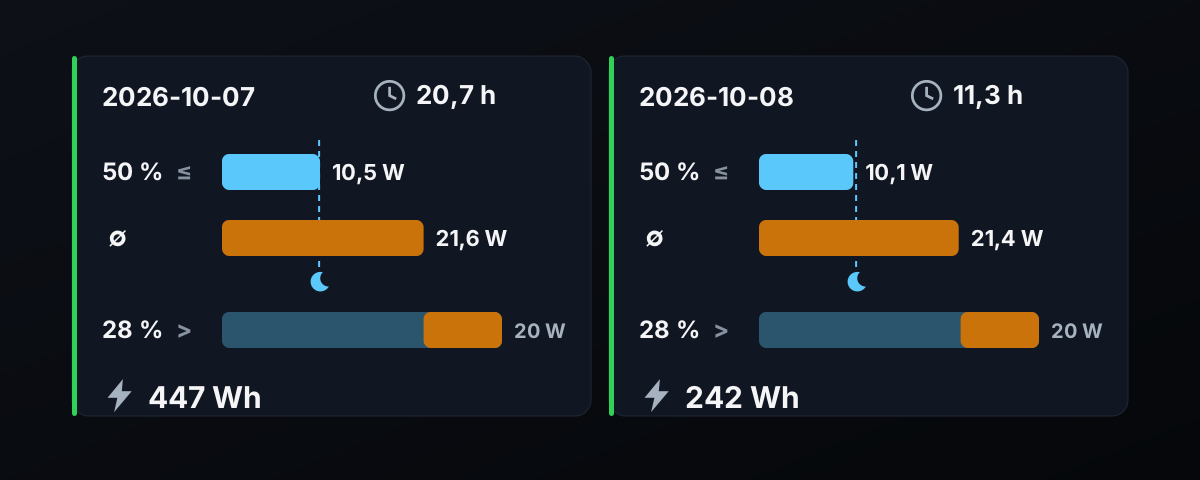
Since October 6, 2026 at 23:46, we have been logging GPU power roughly every 10 seconds, regardless of what the machine is doing. For each day, the table shows the time actually covered. Here are the first two days.
| Jour | Time period covered | Moyenne | Median | GPU energy | Share of time above 20 W |
|---|---|---|---|---|---|
| October 7 (intensive measurement day) | 20,7 h | 21,6 W | 10,5 W | 447 Wh | 28 % |
| October 8 (until 11:18 a.m.) | 11,3 h | 21,4 W | 10,1 W | 242 Wh | 28 % |
La médiane vaut 10,5 W le 7 octobre et 10,1 W le 8: elle est proche de la valeur de repos (10,4 W). La moitié du temps, le GPU est donc au repos. La moyenne, 21 W environ, est plus haute à cause des tâches. Le GPU ne dépasse 20 W que pendant 28 % du temps.
Even the intensive measurement day on October 7 used only 447 Wh on the GPU side over the 20.7 hours covered: 9 cents of electricity.
Here are two projections, as ballpark figures. At a constant 10.4 W, 30 days comes to 7.5 kWh, or €1.50. At 21.5 W, the average of our first two days (measurement days, with 28% of the time above 20 W), 30 days comes to 15.5 kWh, or €3.10. These aren't measurements for the month: they'll be replaced by the full log, GPU only.
#Is the 240 W power supply enough?
The AI TOP ATOM ships with a 240 W USB-C adapter, according to GIGABYTE's spec sheet. In our per-task measurements, the highest peak is 95.0 W, and the continuous measurement also stayed below 100 W. NVIDIA lists 140 W as the thermal design power (TDP) of the GB10 chip, which combines the GPU and the CPU.
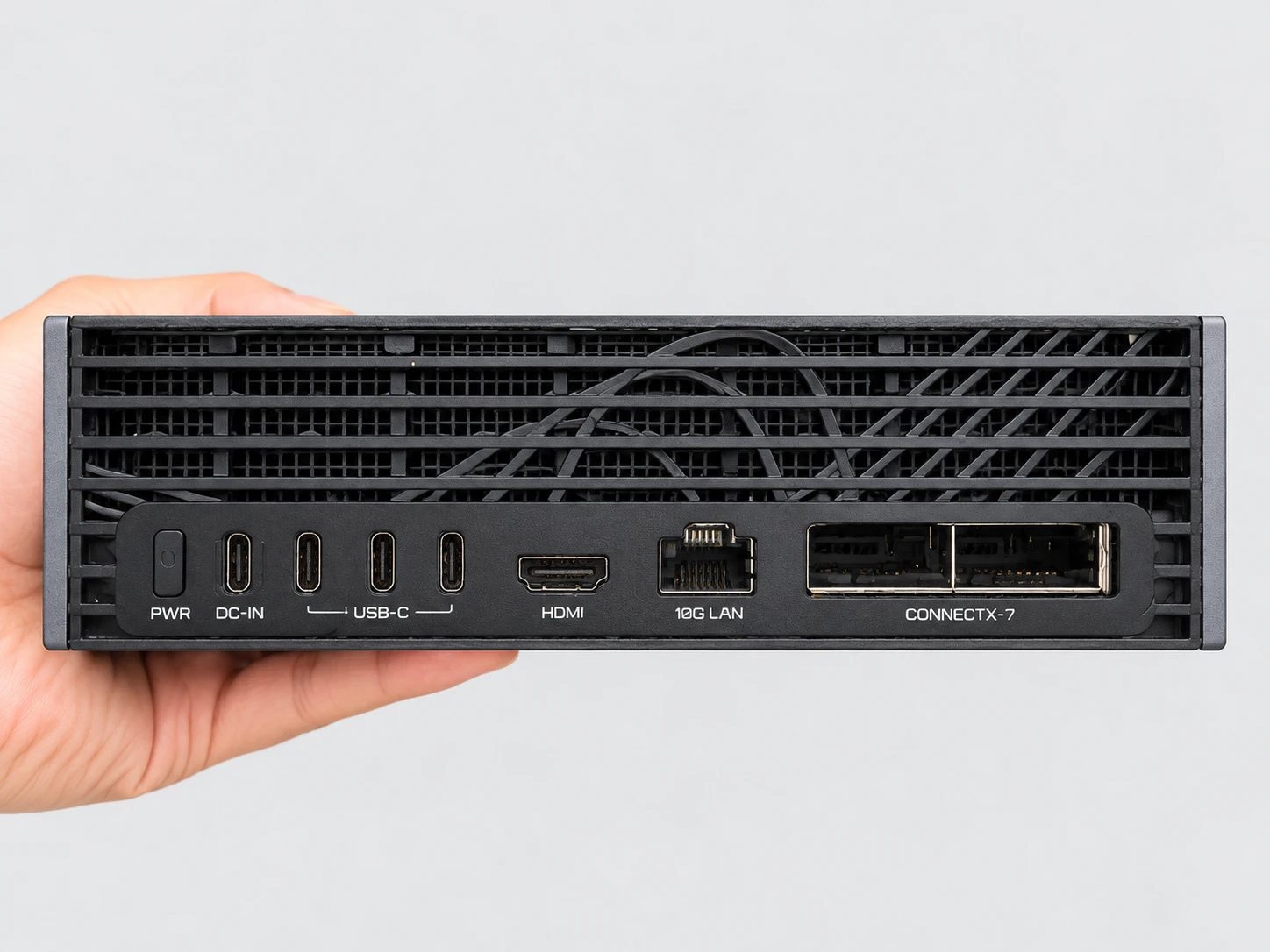
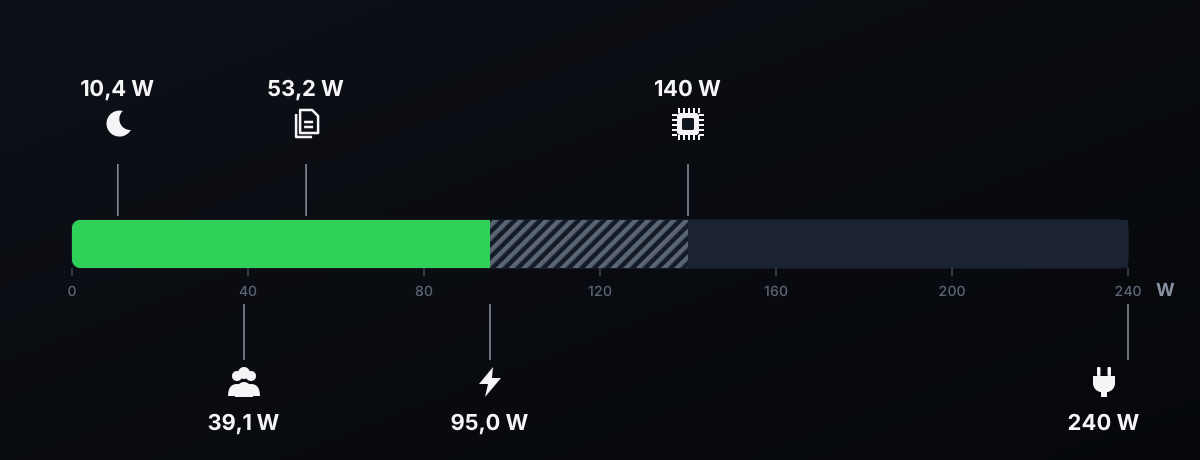
So there's still headroom. The adapter's 240 W covers the chip and the rest of the machine: memory, SSD, networking, and fans.
#What do others measure at the wall?
The measurements published by ServeTheHome and Peter Falkingham cover the whole machine at the wall. Their methodology differs from our GPU readings, so they give an order of magnitude, not a direct comparison.
| Source | Situation | Measured power |
|---|---|---|
| ServeTheHome (AI TOP ATOM) | Idle, network connected | 36 à 37 W |
| Peter Falkingham (AI TOP ATOM) | Everyday use | 40 à 60 W |
| ServeTheHome (AI TOP ATOM) | Sustained load | 102 to 158 W, peaks just under 200 W |
ServeTheHome also notes two fans, each rated at 3 W. ServeTheHome records peaks just under 200 W. All of these values stay within the power supply's 240 W.
#What these measurements don’t tell you
- The GPU alone
- We don't measure the CPU, memory, SSD, network, or power supply losses.
- Scope of the measurements
- Sensor readings describe the GPU alone. Total power draw at the wall falls under a separate protocol.
- Only the first few days
- The 30-day measurement is in progress. The projections on this page are calculations, not measurements for the month.
- Typical tasks
- Our tasks don't cover every use case. Your hours of use and your models will change the total.
- A single machine
- We measured a single AI TOP ATOM. We give no figures for other GB10 machines.
- The rate
- The EDF rate is the one from August 2026. Your plan, such as Heures Creuses (off-peak), may give a different result.
Updates and corrections: this page will be revised at the end of the 30-day measurement, or if a new version of DGX OS changes these results; each correction will be dated.
#Who ATOM is the right choice for
What follows comes from our GPU measurements, along with their limitations.
- The ATOM is the right choice if you want a local AI that's cheap to power
- At idle, the GPU draws 10.4 W. A thousand private assistant responses cost 3 euro cents in GPU energy.
- … if you leave it on all day
- Our first two days were measurement days (21.5 W on average): 30 days at that rate comes to 15.5 kWh, or €3.10. At idle alone, 30 days comes to €1.50.
- … if you share it within a team
- Eight users for 2 hours: 78.8 Wh, or 1.6 euro cents.
- … if you train your own models
- One 85-minute LoRA training run: 76.7 Wh, or 1.5 euro cents.
- … if you want a simple power setup
- A 240 W adapter, and a GPU whose highest peak is 95.0 W in our per-task measurements.
If you need to justify an energy budget down to the euro, add a plug-in power meter: it will give you the whole machine's total, which our GPU readings don't.
#FAQ
How much electricity does the AI TOP ATOM's GPU use at idle?+
How much do 1,000 responses from a private assistant cost?+
How much does a month of use cost?+
How is GPU power measured?+
Is the 240 W power supply enough?+
How much power does the whole machine draw, not just the GPU?+
Feedback, an error, or a clarification? Let us know—it improves the guide for everyone.