Running a 70B LLM locally on GB10: the tutorial complet
On a GIGABYTE AI TOP ATOM (NVIDIA GB10 chip, 128 GB), Llama 3.3 70B fits with room to spare: 43.6 GB with an 8,192-token context, 82 GB with 131,072. It generates between 4.6 and 5.3 tokens per second via three paths: Ollama, llama.cpp, or vLLM. A Llama 3.2 1B draft model brings llama.cpp to 12 tokens per second on prose and 19 on code. With eight users, vLLM sustains an average of 38.6 tokens per second in total over two hours.
A 70-billion-parameter model like Llama 3.3 70B is “dense”: it uses all of its parameters to write each word, and it needs a lot of memory. The 128 GB in a GB10 machine fits it with plenty of room to spare. This tutorial gives the commands for three ways to install it, tested on an AI TOP ATOM kindly provided by GIGABYTE, followed by the measurements that help you choose: speed, a small draft model, context memory, stability over two hours, and multi-user serving.
#The machine, the method, and the units
First, a few terms. A token is a piece of a word: in French, a token is about two-thirds of a word. The context is the text the model keeps in memory during an exchange: your questions, your documents, and its answers. Write speed is the rate at which the response appears, in tokens per second (tok/s). Read speed is the rate at which the machine ingests your text before responding.
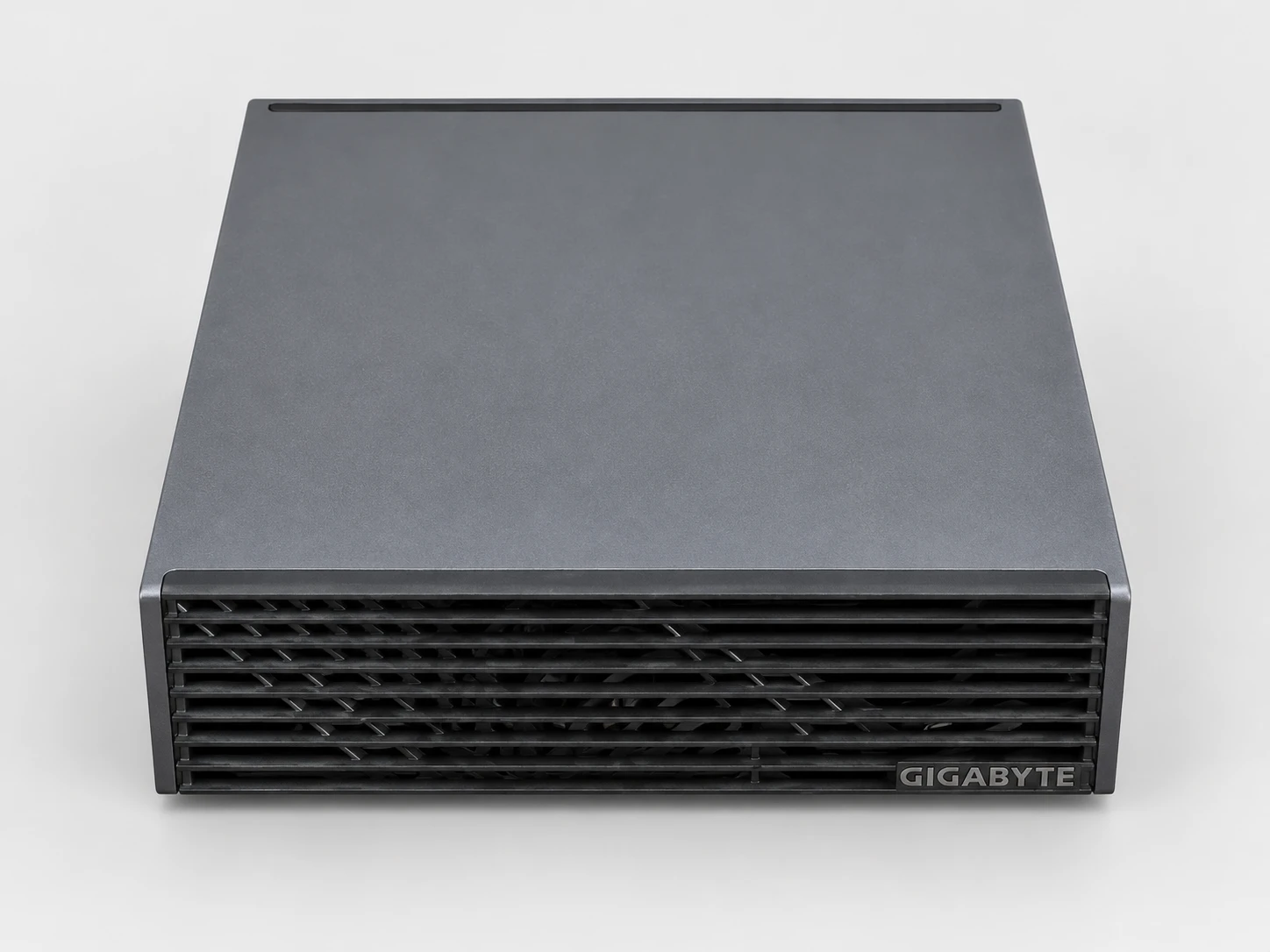
The machine is a GIGABYTE AI TOP ATOM, model ATAGB10-9000. Its NVIDIA GB10 chip combines 20 Arm cores and a Blackwell GPU, which share 128 GB of memory at 273 GB/s. The SSD is a 4 TB PCIe 5.0 drive. It runs DGX OS 7.5.0, NVIDIA's Ubuntu-based operating system (driver 580.159.03, CUDA 13.0). The system sees 121.7 GB of memory.
- What comes from the NVIDIA GB10 platform
- The chip, its 128 GB at 273 GB/s, and DGX OS determine the speeds in this guide. When we replayed two published benchmarks for the NVIDIA DGX Spark, with llama.cpp and with Ollama, our speeds were within 4.3% at most. To our knowledge, they should therefore hold for other 128 GB GB10 machines. The measurements in this guide were taken on the AI TOP ATOM.
- What comes from GIGABYTE
- The roughly one-liter chassis and its cooling, the finish, the SKUs (the 9000 comes with a 4 TB PCIe 5.0 SSD), and the reseller's warranty. During our two hours of continuous serving, the GPU never exceeded 72 °C and no throttling occurred.
Measurements were taken on October 6 and 7, 2026 (October 7 and 8 for the private assistant with Open WebUI). The protocol was frozen on October 6 at 13:30, before the first measurement. Dated amendments, written before the tests they describe, added speculative decoding and the memory budget. The method and data behind our tables are published on our methodology page.
The llama.cpp and TensorRT-LLM generation speeds come from six 400-token texts: three in French prose and three code requests. Those for Ollama (a 300-word text) and vLLM (random requests with 1,024 input tokens and 256 output tokens) follow the protocols described in their respective sections. Temperature is set to 0: the model always picks the most likely word, which makes the runs comparable. We report the median of the three texts of each type.
Memory sizes are in GB (1 GB = 1,024 MB, as Linux displays it); bandwidths in GB/s are the manufacturers' stated figures, in decimal units. The versions used are llama.cpp b11430 (October 5, 2026 build), Ollama 0.34.1, vLLM 26.09, and TensorRT-LLM 1.3.0rc12, the latter two in NVIDIA containers. The first guide in our series gives measurements for 13 models, including Llama 3.3 70B; this one shows how to install it and speed it up.
#Path 1: Ollama, the simplest
Ollama is the simplest way to get started: one archive to extract, one command to download the model, another to talk to it. We installed version 0.34.1 from the official Linux Arm archive, in a folder and without a system service. If you prefer the usual installer, our Linux installation guide covers it.
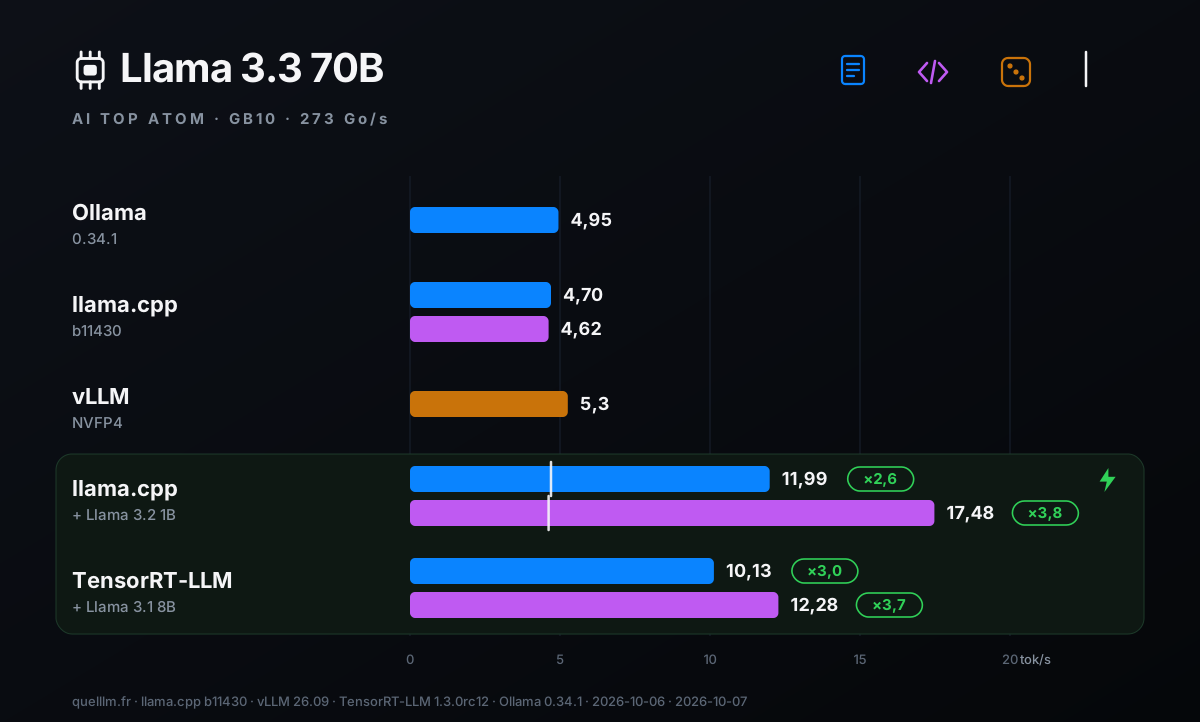
The --verbose option displays statistics at the end of the response. On our setup, Llama 3.3 70B (in Q4_K_M, a weight compression format) generates at 4.97 tok/s on the first run and 4.95 tok/s on the second. The ollama ps command shows 85 GB loaded, in decimal units: Ollama opened a 131,072-token context on its own. On an 18,823-token text, prompt processing takes 55.6 s, or 338.7 tok/s, and the generation that follows stays at 4.38 tok/s.
To put these numbers in context: Ollama reports 4.423 tok/s for Llama 3.1 70B Q4_K_M on a NVIDIA DGX Spark (version 0.12.6, October 23, 2025). With the same version, the same script, and the same model (Llama 3.1 70B), our ATOM delivers 4.34 tok/s, within 2%. To reduce the context and memory footprint, set the OLLAMA_CONTEXT_LENGTH variable before starting the server; we didn't measure this variant.
#Path 2: llama.cpp, the one with the most settings
llama.cpp is a widely used open-source engine. It reads models in GGUF format, a single file that contains the weights. You need to compile it once for the GB10 chip, but it gives you access to every setting: context size, context cache format, draft model. The build follows the NVIDIA guide, with CUDA architecture 121a-real (the GB10's), but without libcurl (-DLLAMA_CURL=OFF) or RPC.
The chosen file is Llama 3.3 70B in Q4_K_M, published by bartowski: 39.6 GB. With the disk cache cleared, llama.cpp loads it from the SSD in 8 s. The hf command comes from the huggingface_hub library (install with: pip install -U huggingface_hub). If Hugging Face asks you to accept the Llama license, accept it on the website, then log in with hf auth login.
- -ngl 99
- Offloads all of the model's layers to the GPU.
- -fa on
- Enables Flash Attention, which makes reading the context more efficient.
- -lm dio
- Reads the file through direct disk access, bypassing the system cache (mmap). This is the mode used in the reference table the llama.cpp project published for the DGX Spark.
- -c 16384 -np 1
- A 16,384-token context for a single user. The requested context is shared among concurrent users.
- --host 127.0.0.1
- The server is reachable only from the machine itself.
On our six texts, llama-server generates at 4.70 tok/s for prose and 4.62 for code. The llama-bench measurement tool reports 4.8 tok/s for generation (32 tokens) and 405 tok/s for prompt processing (2,048 tokens). The model takes up 43.6 GB with an 8,192-token context.
For reference, memory reads at most 273 billion bytes per second, and each token requires rereading the model weights, i.e., 42.5 billion bytes: the theoretical maximum is 6.4 tok/s, and the measurement reaches about three quarters of that.
#Option 3: vLLM in NVFP4, for multiple users
vLLM is a server designed to serve multiple people at once. NVIDIA ships it in a container, meaning an isolated program launched by Docker. The model is Llama 3.3 70B in NVFP4, a 4-bit format from NVIDIA that Blackwell chips compute natively: it takes up 39.9 GB of memory. The supported-models matrix in NVIDIA's vLLM guide for DGX Spark lists this model.
The --max-model-len 8192 and --max-num-seqs 16 settings cap the context at 8,192 tokens and 16 concurrently processed requests. The --gpu-memory-utilization 0.85 setting sets the share of memory vLLM reserves: here 103 GB, including 59.6 GB of cache. This cache holds 390,352 tokens at once, the equivalent of nearly 48 requests of 8,192 tokens simultaneously. The first startup takes about 7 minutes: 4 min 20 s to read the model, then about 2 minutes of preparation.
For one user, vLLM generates 5.3 tok/s (5.26, 5.27, and 5.26 across three runs), and the first word arrives in 0.73 s on average. With eight concurrent users, the machine generates 37.7 tok/s in total, including the wait for the first word; once its response has started, each user receives 5.0 tok/s.
The first word arrives in 2.8 s on average and in under 4.8 s in the slowest cases. Requests in this test have 1,024 input tokens and 256 output tokens; each data point is measured three times.
#The three paths side by side
| Path | Generation | Memory | Settings | Choose it for |
|---|---|---|---|---|
| Ollama 0.34.1 (Q4_K_M) | 4,95 | 85 GB reported by Ollama (in decimal units, or about 79 GB as this guide counts them) with the 131,072-token context it opens by default | peu | get started fast |
| llama.cpp b11430 (Q4_K_M) | 4.70 for prose, 4.62 for code | 43.6 GB at 8,192 tokens, 51.3 GB at 32,768 | all: context, cache, draft | one user, with a draft |
| vLLM 26.09 (NVFP4) | 5.3; 37.7 total for 8 users | 103 GB reserved with the 0.85 setting | those of a server | multiple users |
All three paths generate at the same speed, within 15%. The reason is simple: for each token, the chip rereads the model weights, and the 273 GB/s memory bandwidth sets the pace for a dense model. A 70B therefore generates at about 5 tok/s, or about 200 words per minute, the pace of unhurried reading.
This pace suits tasks that can wait: summaries, extraction, proofreading, draft replies. For snappy conversation, there are two levers, covered in the following sections: a draft model, and an MoE (mixture of experts) model that uses only part of its parameters for each token.
#Speeding up a 70B with a small draft model
Speculative decoding uses a small model, the draft, that proposes several words ahead (tokens, strictly speaking; we say "words" for simplicity). The large model verifies these words in a single pass: this costs roughly the time of generating just one, because the time is mostly spent reading the weights.
Correct words are kept; the rest are discarded. The draft doesn't choose the text: the large model always does the validating. NVIDIA describes the principle in its DGX Spark guide, and the LMSYS blog notes that this technique partly offsets the machine's bandwidth limit.
#With llama.cpp: a Llama 3.2 1B draft
The draft model must speak the same language as the large model, meaning it must use the same tokenization. The Llama family fits: Llama 3.2 1B, in Q8_0, pairs with Llama 3.3 70B. Four options are enough: -md specifies the draft model, --spec-type draft-simple selects the method, --spec-draft-n-max sets the number of tokens proposed ahead (we call them “words” in this guide), and -ngld 99 places the draft model on the GPU.
| Configuration | French prose | Code | Acceptance (prose / code) |
|---|---|---|---|
| 70B alone | 4,70 | 4,62 | — |
| + Llama 3.2 1B draft, 8 words ahead | 11,99 (×2,6) | 17,48 (×3,8) | 33 % / 50 % |
| + Llama 3.2 1B draft, 16 words ahead | 10,84 (×2,3) | 18,65 (×4,0) | 19 % / 34 % |
The 1-billion-parameter draft model makes the 70B 2.6 to 4 times faster: 12 tok/s on prose and up to 19 tok/s on code. The gain depends on the text. Across three code samples, speed ranges from 13.2 to 18.0 tok/s with 8 words ahead. The draft model is followed more often on code (50% of words kept) than on prose (33%).
Our texts are in French for prose and in English for code; other texts will yield different gains. For prose, 8 words ahead does better than 16 (11.99 vs. 10.84). For code, 16 does slightly better (18.65 vs. 17.48), with a spread between texts of the same order. Start with 8.
The same principle works without a second file when the model carries its own multi-token prediction (MTP) module. With Qwen3.8 27B and the --spec-type draft-mtp option, llama.cpp goes from 11.71 to 21.48 tok/s on prose (×1.8) and from 11.59 to 27.23 tok/s on code (×2.3).
#With TensorRT-LLM: the Draft-Target recipe from NVIDIA
TensorRT-LLM is NVIDIA's library for optimized model serving. Its DGX Spark guide offers the Draft-Target method: Llama 3.3 70B in FP4 is paired with Llama 3.1 8B in FP4 as the draft. Both models are provided by NVIDIA. In version 1.3.0rc12 of the container, the setting value is written Draft_Target, with an underscore.
| Configuration | French prose | Code |
|---|---|---|
| + Llama 3.1 8B FP4 draft, 4 words ahead | 10.13 (×3.0 compared with the same engine without a draft) | 12,28 (×3,7) |
With TensorRT-LLM, the draft model speeds things up 3.0x on prose and 3.7x on code compared with the same engine without a draft: the 70B then generates 10.1 tokens per second on prose and 12.3 on code.
So both options, llama.cpp and TensorRT-LLM, deliver a speedup of the same order, 2.6 to 4 times. For a single user, llama.cpp remains the simplest: one draft file and four options. TensorRT-LLM is the way to go if you want the official NVIDIA recipe, with FP4 models provided by NVIDIA.
#Context memory budget, from 8,192 to 131,072 tokens
Context has a memory cost: the KV cache. This is the memory where the model keeps what it has already read so it doesn't have to recompute it. It grows with context length. llama.cpp reserves the entire cache at load time, so the memory in use after loading is already the final footprint.
We measure it by the drop in available memory (Linux's MemAvailable), after clearing the disk cache. The -ctk q8_0 -ctv q8_0 option stores the cache in 8 bits instead of 16 (f16), which makes it lighter. In the tables and charts, 8k means a context of 8,192 tokens, 32k means 32,768, 64k means 65,536, and 128k means 131,072.
| Model | Cache | 8 192 | 32 768 | 65 536 | 131 072 |
|---|---|---|---|---|---|
| Llama 3.3 70B Q4_K_M | f16 | 43,6 | 51,3 | 61,4 | 81,9 |
| Llama 3.3 70B Q4_K_M | q8_0 | 42,3 | 46,4 | 52,2 | 63,1 |
| gpt-oss 120B MXFP4 | f16 | 61,0 | 61,9 | 63,0 | 65,6 |
| gpt-oss 120B MXFP4 | q8_0 | 60,7 | 61,3 | 62,1 | 63,2 |
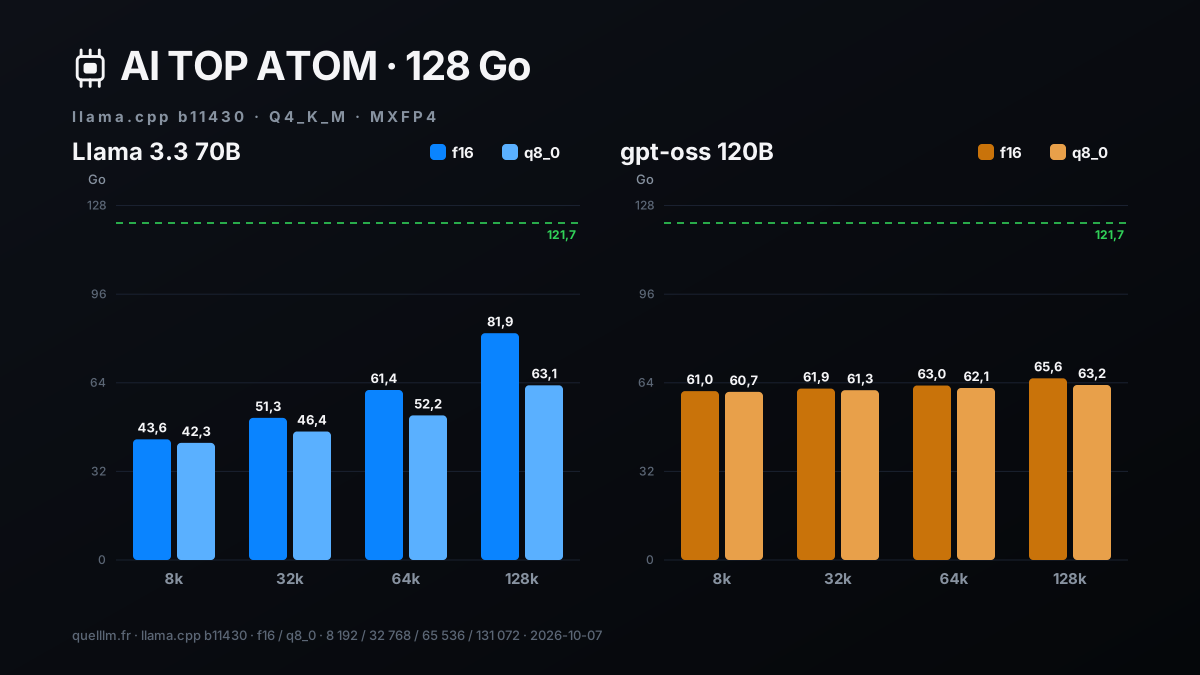
Everything fits within the 121.7 GB, even the 70B with a 131,072-token context in f16: 81.9 GB. Going from 8k to 128k adds 38 GB to the 70B in f16, and 21 GB in q8_0, almost half as much. gpt-oss 120B adds only 4.6 GB: it alternates layers that attend to the whole text with layers that attend only to a short window. The q8_0 format comes at the cost of slightly lower speed, 9 to 11% at 128k for the 70B (next table).
We also filled the context to 90% with practical guides from Service-Public to measure prompt processing and generation at full context. At 128k, the text comes to 117,605 tokens for the 70B and 117,889 for gpt-oss 120B, or roughly 200 pages.
| Model | Cache | Text read (tokens) | Memory (GB) | Lecture | Generation |
|---|---|---|---|---|---|
| Llama 3.3 70B | f16 | 29 214 (32k) | 51,4 | 286,1 (102 s) | 4,22 |
| Llama 3.3 70B | q8_0 | 29 214 (32k) | 46,5 | 271,1 (108 s) | 4,02 |
| Llama 3.3 70B | f16 | 117 605 (128k) | 82,0 | 181,9 (646 s) | 2,86 |
| Llama 3.3 70B | q8_0 | 117 605 (128k) | 63,2 | 164,6 (715 s) | 2,54 |
| gpt-oss 120B | f16 | 29 227 (32k) | 61,7 | 1 443 (20 s) | 43,81 |
| gpt-oss 120B | q8_0 | 29 227 (32k) | 61,2 | 1 401 (21 s) | 43,96 |
| gpt-oss 120B | f16 | 117 889 (128k) | 65,4 | 1 073 (110 s) | 26,93 |
| gpt-oss 120B | q8_0 | 117 889 (128k) | 63,4 | 993 (119 s) | 24,97 |
Everything works at full context. gpt-oss 120B reads a 200-page text in 110 seconds and keeps generating at nearly 27 tok/s. The 70B reads the 117,605 tokens at 182 tok/s. For very long documents, a MoE model is faster, for both reading and generation.
#Two hours of serving eight users
A server has to hold up over time. We launched vLLM 26.09 with Llama 3.3 70B in NVFP4 and sent requests for two hours: eight users continuously, in batches of 32 requests with 1,024 input tokens and 256 output tokens. A chip-level log, at one reading per second, tracked GPU power, clock speed, and temperature.
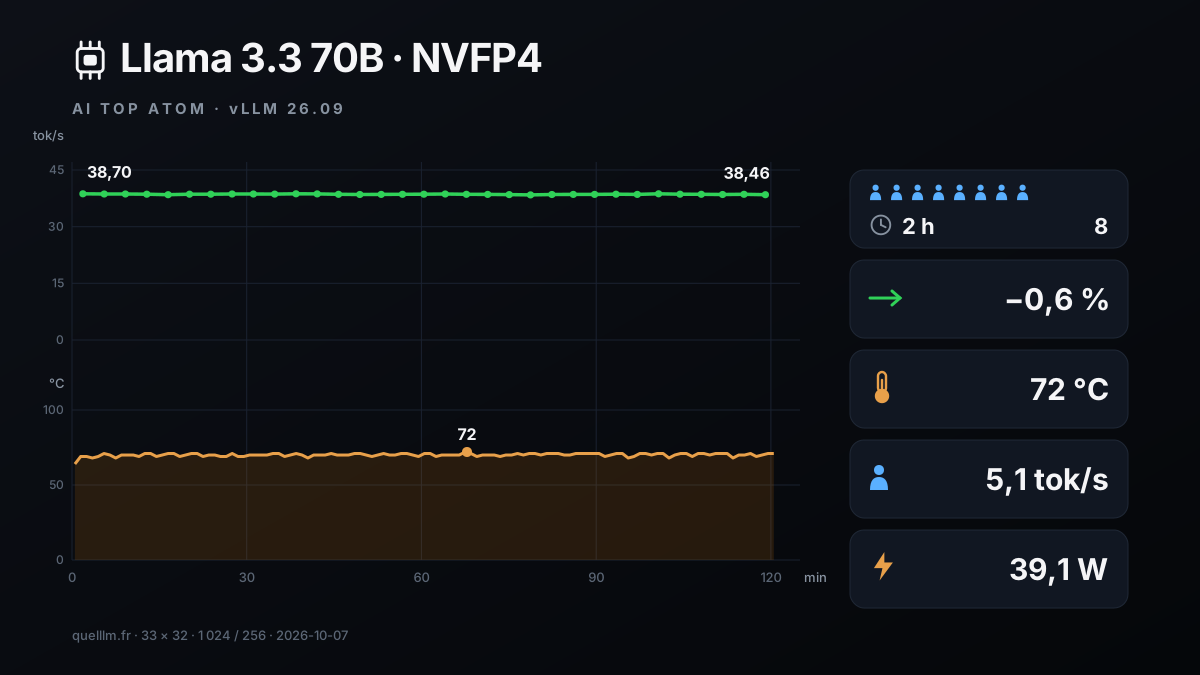
The result is simple: the speed didn't change. Total throughput went from 38.70 tok/s in the first interval to 38.46 in the last, with a minimum of 38.40 and a maximum of 38.70, a difference of −0.6%. Each user gets 5.1 tok/s. The first word arrives in 2.8 s at the median, between 2.4 and 2.9 s depending on the interval.
In total, the machine served 1,056 requests, read 1,081,344 tokens, and generated 270,336 tokens, without a single error. The GPU peaked at 72 °C. Its median clock speed was 2,528 MHz, and no throttle reason was recorded during the two hours of monitoring.
Average GPU power was 39.1 W, peaking at 95.0 W. These are GPU watts, as read by the chip: they don't include the CPU, memory, SSD, or power supply. The two hours come to 78.8 Wh for the GPU, or 1.6 euro cents at the EDF Tarif Bleu Base rate (6 kVA) of 20.01 cents per kWh.
#Turn it into a server: OpenAI API, key and Open WebUI
An OpenAI API is a request format that many tools can speak: code editors, chat interfaces, scripts. llama-server and vLLM both offer it. To protect it, llama-server accepts a key via the --api-key option: without the key, it responds with a 401 error. We validated these three calls with gpt-oss 20B; for the 70B, it's the same command with a different file.
The first call returns 401, the second the list of served models, and the third a response in OpenAI format. The --jinja option applies the chat template provided in the model file.
For a chat interface, Open WebUI connects to this API. Here's the stack from our private assistant test (another guide in the series), with gpt-oss 120B. The model server sits on an internal Docker network with no internet access. Open WebUI 0.11.4 is connected to that network and to an access network.
This way, the model has no outbound connection. The server has no key, since only the internal network can reach it; the value local for OPENAI_API_KEY is only there to satisfy Open WebUI. To serve the 70B instead, replace the file path with that of Llama-3.3-70B-Instruct-Q4_K_M.gguf and adjust -c and -np to the memory budget covered above.
Then open http://127.0.0.1:3100 in a browser on the machine: the model appears in the list. In our private assistant test, the full stack, including an extra embedding server (bge-m3), was ready in 66 seconds. According to NVIDIA's llama.cpp guide, Open WebUI, Continue.dev, and other clients can connect to this API, which follows the OpenAI API format (server address followed by /v1).
#The fast alternative: a 120B MoE model
An MoE (mixture of experts) model contains many parameters but uses only a fraction of them for each token. gpt-oss 120B has 117 billion parameters, 5.1 billion of them active, and OpenAI publishes it directly in MXFP4 format.
On the GB10, it generates at 58.0 tok/s with the llama-bench measurement tool (32-token generation), and at 54.4 tok/s for long responses on llama-server, for both prose and code. That's more than 11 times the speed of the dense 70B, with memory usage of 61.0 GB at 8,192 tokens and 65.6 GB at 131,072.
Speed says nothing about quality: we did not compare the two models' answers. Here's how to choose. Use gpt-oss 120B for chat, agents, and long documents, where speed matters. Use Llama 3.3 70B if you need that specific model, for example a model fine-tuned from it, or for batch jobs where 5 tok/s is enough. Measurements for all 13 models, from 4B to 235B, are in our first guide in the series.
#What this guide does not measure
- Response quality
- We measure speed and memory, not how good each model is.
- Draft model gains on other texts
- Our six texts are in French for prose and in English for code. Gains depend on the text and the language.
- Contexts beyond 131,072 tokens
- We measured neither their memory nor their speed.
- The other GB10 machines and the 64 GB version
- Our measurements on the ATOM 128 GB match the published benchmarks for the DGX Spark.
- Power consumption of the entire machine
- Wattages shown are for the GPU, as read from the chip.
Updates and corrections: this page will be revised if a new version of DGX OS, llama.cpp, Ollama, vLLM, or TensorRT-LLM changes these results; each correction will be dated.
#Who ATOM is the right choice for
What follows comes from our measurements on the ATOM, a 128 GB GB10 machine.
- The ATOM is the right choice if you want a 70-billion-parameter model at home
- It fits with room to spare: 43.6 to 82 GB out of 121.7 GB, with a context of 8,192 to 131,072 tokens, and three installation paths work.
- … if multiple people or agents share the model
- Eight users get 37.7 tok/s total on a short run, and 38.6 tok/s on average over two hours, with no errors at all.
- … if you want more speed without changing machines
- A small draft model speeds up the 70B by 2.6 to 4x, with llama.cpp or with the NVIDIA recipe.
- … if you want fast chat or long documents
- gpt-oss 120B generates at 54.4 tok/s and reads 200 pages in 110 seconds.
- … if your work runs through the NVIDIA ecosystem
- CUDA 13, vLLM and TensorRT-LLM in the NVIDIA containers, and llama.cpp built for the GB10 all worked for us on DGX OS 7.5.0.
On the GIGABYTE side, the roughly one-liter chassis kept the GPU at 72 °C at most during two hours of continuous load, with no throttling. GB10 machine prices change every week: check them on the machine's product page before you buy.
#FAQ
Can you run a 70B model on a 128 GB GB10 machine?+
How fast does a 70B generate on the AI TOP ATOM?+
Should you choose Ollama, llama.cpp, or vLLM?+
How can you make a 70B faster without changing machines?+
Can a 70B serve multiple people for hours?+
Is a 120B MoE model better than a dense 70B?+
Feedback, an error, or a clarification? Let us know—it improves the guide for everyone.