Local fine-tuning on GB10: measurements and method
On a GIGABYTE AI TOP ATOM (NVIDIA GB10 chip, 128 GB), a small model trained for a specific task can outperform a very large model on that task. After 85 minutes of LoRA training, Qwen3-8B extracts the data with no errors at all from 95% of 200 previously unseen fictional invoices, compared with 62.5% for gpt-oss 120B and 26% without training. QLoRA with Unsloth also fits: 41 GB for a 70B, 64 GB for gpt-oss 120B. Training cost 1.5 euro cents of electricity on the GPU side.
Fine-tuning trains an existing model a little further so it succeeds at a specific task. With 128 GB of unified memory, a GB10 machine can do this at your place, without renting a server or entrusting your data to an online service. This guide follows a complete case, measured on an AI TOP ATOM provided free of charge by GIGABYTE: extracting invoice data as JSON. It also gives measurements for QLoRA (the same method on a model compressed to 4 bits) with Unsloth up to gpt-oss 120B, along with the commands from our runs.
#The real-world case: reading invoices and producing JSON
The task is common in a small business: from the text of an invoice, quote, or credit note, the model must return JSON, meaning a structured record that software can read. This record has 31 scored fields: document type, number, dates, issuer, customer, product lines, discount, totals, VAT, deposit, IBAN. We chose this task because the answer can be checked field by field, without another model having to judge it.
The documents are fictional. A small program generated 12 layouts, meaning 12 invoice formats, with made-up company names. Its randomness is set by a fixed "seed," so it produces the same documents on every run. Training uses 2,000 documents across 10 layouts.
The evaluation uses 200 never-seen documents: 100 on the same 10 layouts, and 100 on 2 layouts absent from training. Those last 100 show whether the model understood the task or merely memorized patterns.
The model receives the document's text, not an image or a PDF. Here is an excerpt of the trained model's response on the first test document, a fictional four-line credit note.
#The method: LoRA, one epoch, 85 minutes
Benefit from our experience and a guided path to build your local assistant and use your AI every day.
- Lifetime online access
- PDF + files
- Refunded within 30 days
The machine is a GIGABYTE AI TOP ATOM, model ATAGB10-9000: NVIDIA GB10 chip, 128 GB of unified memory, a 4 TB PCIe 5.0 SSD, running DGX OS 7.5.0 (driver 580.159.03, CUDA 13.0). The software: the NVIDIA PyTorch container (version 26.03, with PyTorch 2.11), PEFT 0.21.2 for LoRA, Unsloth 2026.10.1 for QLoRA, and, for serving, the NVIDIA vLLM 26.09 container (vLLM 0.29.0). Our first guide in the series covers the machine and the speed of 13 models.
LoRA (Low-Rank Adaptation) leaves the original model intact and trains small matrices added to its layers. The result is an adapter, a small file you load with the model. Here, 43.6 million parameters are trained, compared with 8 billion for Qwen3-8B.
Three terms come up throughout this guide. A training step processes a batch of 4 documents. An epoch is one complete pass over the 2,000 documents. Loss measures the gap between the answer written by the model and the expected answer: the lower, the better.
- Model
- Qwen3-8B in bf16, a 16-bit number format, with no compression.
- LoRA
- Rank 16, alpha 32 (a scaling coefficient), dropout 0.05 (a small share of values is randomly ignored at each step to limit overfitting), on the 7 projections of each layer, meaning its 7 weight matrices: q, k, v, o, gate, up, down. The rank sets the size of the added matrices.
- Duration
- 1 epoch: 500 steps of 4 documents.
- Learning rate
- 1e-4, or 0.0001, with a gradual warmup over 30 steps followed by cosine decay.
- Lots
- We sort the 2,000 documents by length, form the batches, then shuffle their order with a fixed seed. Each batch contains documents of similar length, which means less unnecessary padding and therefore faster training.
- Perte
- Computed on the JSON response alone. The prompt and the document are masked: the model learns to write the response, not to copy the document.
- Length
- Up to 2,304 tokens. The longest document has 2,204 and the average is 1,143: none is truncated.
- Memory
- Gradient checkpointing is enabled: the model recomputes some results instead of keeping them all in memory.
These settings were fixed by an amendment to our protocol, dated October 7, 2026, before any evaluation on the 200 test documents. The protocol was frozen before the first measurement; the method, the dated list of amendments, and the data behind our tables are published on our methodology page. Memory figures in this guide are in GB, as Linux displays them: 1 GB = 1,024 MB.
Everything happens in the NVIDIA PyTorch container (version 26.03). A Python environment inside it gets the transformers and PEFT libraries. The paths below are simplified; the options are the ones from our test runs.
#Results: 95% perfect documents
The score compares, field by field, the value written by the model with the expected value, after normalization. A document is "perfect" when all its fields are correct. All three models receive the same prompt, at temperature 0 (the setting that makes responses most stable), through vLLM 26.09, 16 documents at a time. For Qwen3-8B, thinking is disabled. For gpt-oss 120B, reasoning effort is set to "low."
| Model | Correct fields | Perfect documents | Perfect, known layouts | Perfect, new layouts | Time for 200 documents |
|---|---|---|---|---|---|
| Qwen3-8B without training | 84,8 % | 26,0 % | 27 % | 25 % | 686 s |
| gpt-oss 120B without training | 97,5 % | 62,5 % | 58 % | 67 % | 991 s |
| Qwen3-8B + LoRA (85 min) | 99,2 % | 95,0 % | 96 % | 94 % | 524 s |
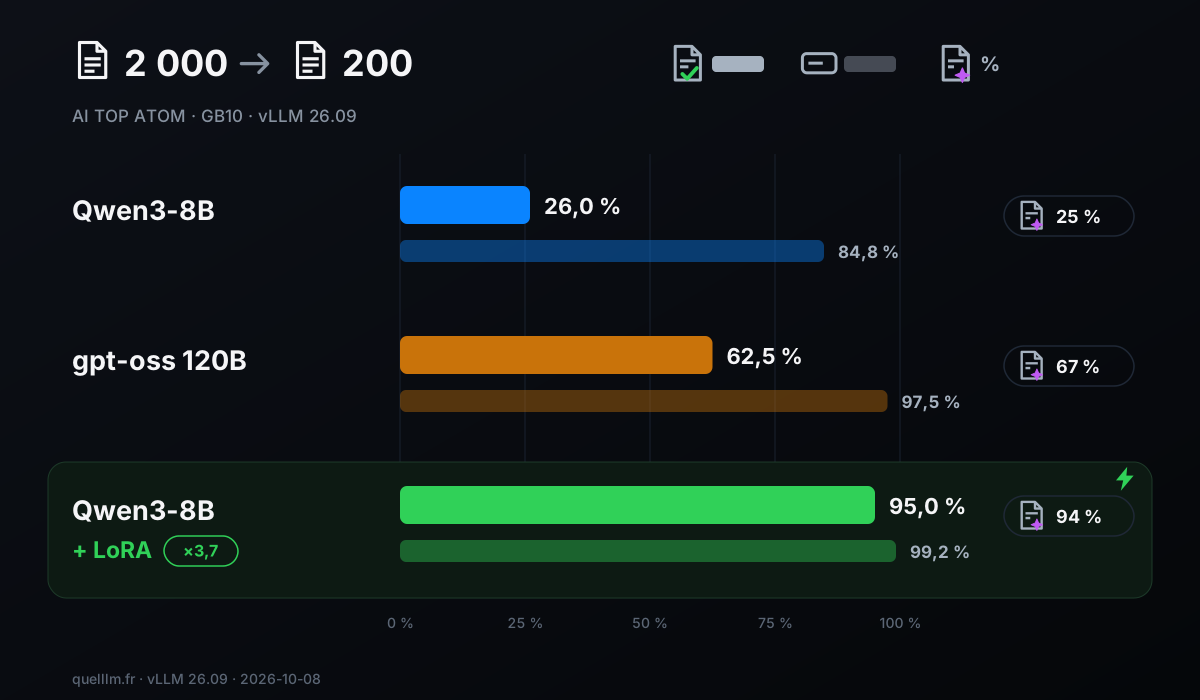
The trained model gets 95.0% of documents perfect, compared with 26.0% for the same model without training: 69 points higher, or 3.7 times as many error-free documents. It beats gpt-oss 120B (62.5%), a model with 117 billion parameters. It's also the fastest: 524 seconds for the 200 documents, compared with 991 seconds for gpt-oss 120B and 686 seconds for Qwen3-8B without training. Its responses are also shorter: 98,847 tokens written, compared with 160,702 for gpt-oss 120B.
On the 100 documents with never-before-seen layouts, the trained model maintains 94% perfect documents and 98.5% correct fields, compared with 96% and 99.9% on known layouts. The gap is 2 points on perfect documents (96% vs. 94%): the adapter isn't limited to the formats seen during training.
The per-field breakdown shows what training fixed. All 31 fields are exact in at least 97.5% of documents, and 18 of them in 100% of documents. Without training, 10 fields are exact between 49.5% and 61.5% of the time: the amounts (discount, totals, VAT, deposit, net amount due) and the line items (quantity, unit price, VAT rate, amount). After training, these 10 fields are exact 98% to 100% of the time.
All three models return valid JSON in 100% of cases and find the correct number of line items in 100% of documents. The difference therefore comes down to the field values, not the format of the response.
#What it costs: time, memory, electricity
| Metric | Value |
|---|---|
| Training time | 5,090 s, or 85 min (10.2 s per step) |
| Peak GPU memory reported by PyTorch | 33.3 GB |
| GPU power, average and peak | 53.0 W and 62.7 W |
| GPU temperature, average and maximum | 65 °C and 77 °C |
| GPU-reported throttling | none across the 5,206 readings |
| GPU energy for training (87 minutes of readings, including loading) | 76.7 Wh |
| Cost at the EDF Tarif Bleu Base rate (20.01 euro cents per kWh including tax) | 1.5 euro cents |
| GPU energy to read the 200 test documents with the trained model | about 6 Wh |
These figures cover the GPU alone, as reported by the chip. According to NVIDIA, the power shown by nvidia-smi is for the GPU alone. The processor, memory, SSD, and power supply are not counted. The rate is EDF's Base option for 6 kVA, from the price schedule effective August 1, 2026; the subscription fee is not counted.
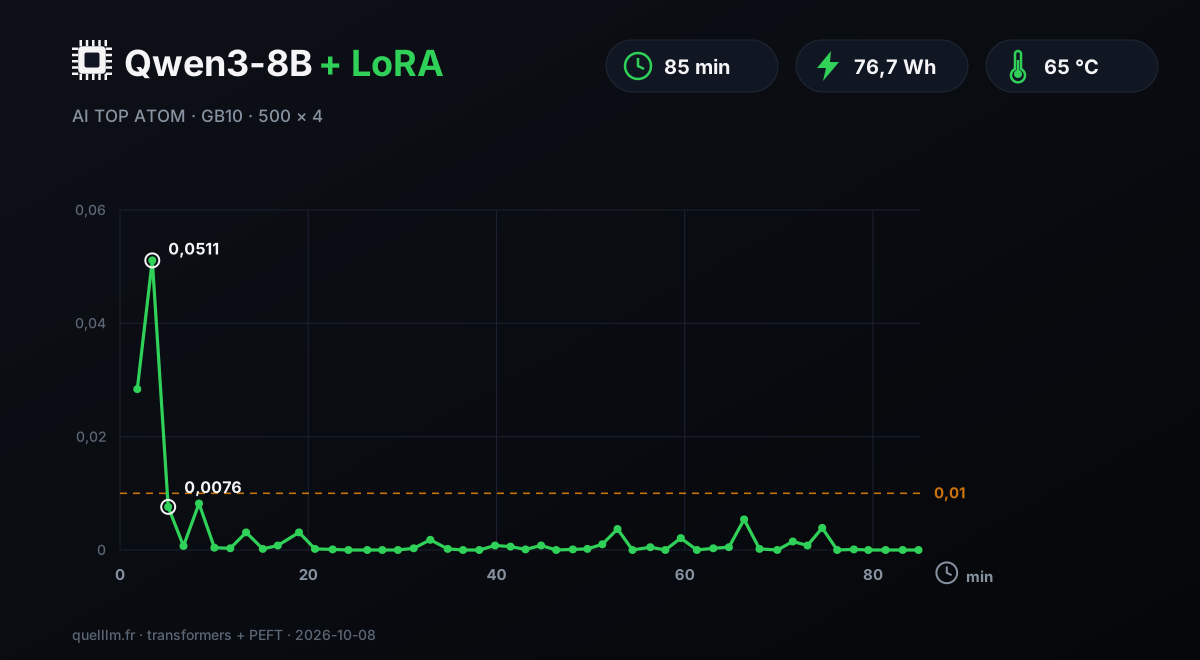
Each point on the curve comes from a single batch of 4 documents, so values vary from one reading to the next. The loss drops below 0.01 by step 30, after 5 minutes of training, and no later reading exceeds 0.0082. A single epoch was enough to reach 95% perfect documents in this case.
#QLoRA with Unsloth: a 70B and gpt-oss 120B on the same machine
QLoRA compresses the model's weights to 4 bits, which greatly reduces its memory footprint, then trains a LoRA adapter on top. It's the way to specialize a large model without changing machines. We used Unsloth, an open-source tool that, according to its publisher, makes fine-tuning lighter and faster.
NVIDIA publishes an official guide for Unsloth on DGX Spark, in a NVIDIA PyTorch container (version 25.11), and also offers an official PyTorch fine-tuning environment for models with 1 to 70 billion parameters. Unsloth states about 68 GB of memory for a 4-bit QLoRA of gpt-oss 120B; we measured a 64.4 GB peak, in the same range.
We measured speed and memory on two models: Llama 3.3 70B and gpt-oss 120B, both in the 4-bit format published by Unsloth. Each run has 40 steps, and the first 10, used for warmup, aren't counted in the average.
Sequences are 1,024 tokens, with a batch size of 1 and a LoRA of rank 16. These steps, run on our protocol's reference text, measure throughput and memory; they do not produce a useful model.
| Model | Chargement | Model memory | Peak GPU memory | Seconds per step | Tokens per second | Trained parameters |
|---|---|---|---|---|---|---|
| Llama 3.3 70B (4-bit QLoRA) | 247 s | 37.6 GB | 41.3 GB | 9,39 | 109 | 207 million (7 projections) |
| gpt-oss 120B (4-bit QLoRA) | 397 s | 58.5 GB | 64.4 GB | 6,35 | 161 | 11.9 million (4 attention projections) |
| Qwen3-8B (LoRA bf16) | — | — | 63.4 GB | 5,42 | 756 | 43.6 million (7 projections) |
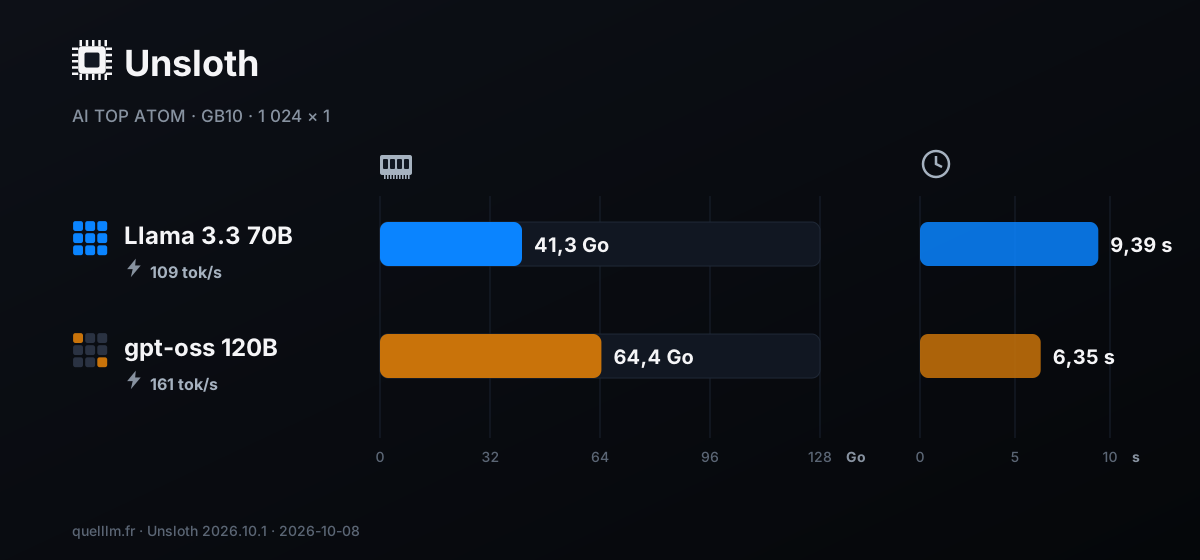
The 70B trains with a 41.3 GB peak, about a third of the 121.7 GB the system sees; gpt-oss 120B needs 64.4 GB. In both cases, there's room left for other services. Notably, gpt-oss 120B runs faster per step than the 70B (6.35 s vs. 9.39 s), even though it's larger.
It's an MoE model, a "mixture of experts": for each token, it uses only 5.1 of its 117 billion parameters. We train only its 4 attention matrices (q, k, v, o), or 11.9 million parameters. The 70B gets a LoRA on its 7 projections, or 207 million trained parameters.
For planning, here is an estimate based on our measurements. 1 000 steps of 1 024 tokens, or about one million tokens, would take 2 h 36 min with the 70B and 1 h 46 min with gpt-oss 120B. Check these durations on your own dataset. The 70B QLoRA run kept the GPU busy for 10.8 minutes, including model loading, for 8.9 Wh on the GPU side.
Unsloth 2026.10.1 is installed in the same Python environment as above, in the same PyTorch container. For step-by-step installation, follow the official NVIDIA guide and the Unsloth documentation, linked at the end of the page.
#Serving the trained model with vLLM
vLLM is an open-source server designed to handle multiple users at once; we use it in the container provided by NVIDIA. It loads the base model, then adds the adapter to it. The API then exposes two names: Qwen3-8B, without the adapter, and factures, with the adapter. We evaluated both on the same server, which makes the comparison fair.
With 16 documents sent at a time, the 200 invoices take 524 seconds. At that rate, 1,000 invoices take about 44 minutes: this figure is calculated from our measurement. The port is bound to the local address 127.0.0.1. To open the service to your network, add an API key; the guide on vLLM in production covers this step in detail.
#Reproduce this case yourself in five steps
- 01Prepare the examplesGather pairs: the text of a document and the expected JSON response. Write a single prompt, the same one for training and evaluation. We used 2,000 examples; we did not measure a minimum threshold.
- 02Keep a test setSet documents aside and never show them to the model. Add a few layouts that are absent from training, so you can tell whether the model generalizes.
- 03Train for one epochSort the examples by length, form the batches, compute the loss on the response alone, and monitor the loss curve.
- 04Score before and afterScore the base model and the trained model with the same prompt, field by field. Also score a large model without training: that's the most useful comparison.
- 05Serve with vLLMLoad the adapter with the enable-lora option and connect your software to the API.
#Fine-tuning, RAG, or a better prompt: which should you choose?
Start with the prompt: it's free and immediate. If the model needs to find facts in your documents, RAG is a better fit: it's an assistant that searches your files first, before answering.
Fine-tuning is the right tool when the task is repetitive, the output format has to stay stable, and you have examples. Reading invoices meets all three conditions. The two approaches can be combined on the same machine; another guide in the series shows a complete RAG assistant.
#The limits of our measurements
- Fictional documents
- Our invoices are generated by a script, with 12 layouts. Real documents, scanned or photographed, first require text recognition (OCR) and may produce different results.
- A single training run
- We trained a single adapter and scored each model once, at temperature 0. We did not measure variation from one training run to another or compare with a longer training run.
- gpt-oss 120B
- It's scored with low reasoning effort. A different setting may change its score.
- QLoRA
- The QLoRA measurements cover speed and memory, over 40 steps. We did not evaluate the quality of trained 70B or 120B models.
- Energy
- It covers the GPU only.
- Out of scope
- We did not measure training all of a model's parameters, or using multiple connected machines.
Updates and corrections: this page will be revised if a new version of Unsloth, vLLM, or DGX OS changes these results; each correction will be dated.
#Who ATOM is the right choice for
- An SMB or professional firm that wants to specialize a small model on its documents
- 85 minutes and 1.5 euro cents of electricity on the GPU side to go from 26% to 95% perfect invoices on our fictional invoice dataset, without sending a single document to a third party.
- A developer or data team building prototypes
- Qwen3-8B with LoRA, a 70B or gpt-oss 120B with QLoRA: all three fit on the same machine, with 33 to 64 GB of peak GPU memory.
- A team that wants to train, evaluate, and serve in one place
- The same machine trained the adapter, scored three models, and served the responses with vLLM.
- An office without a server room
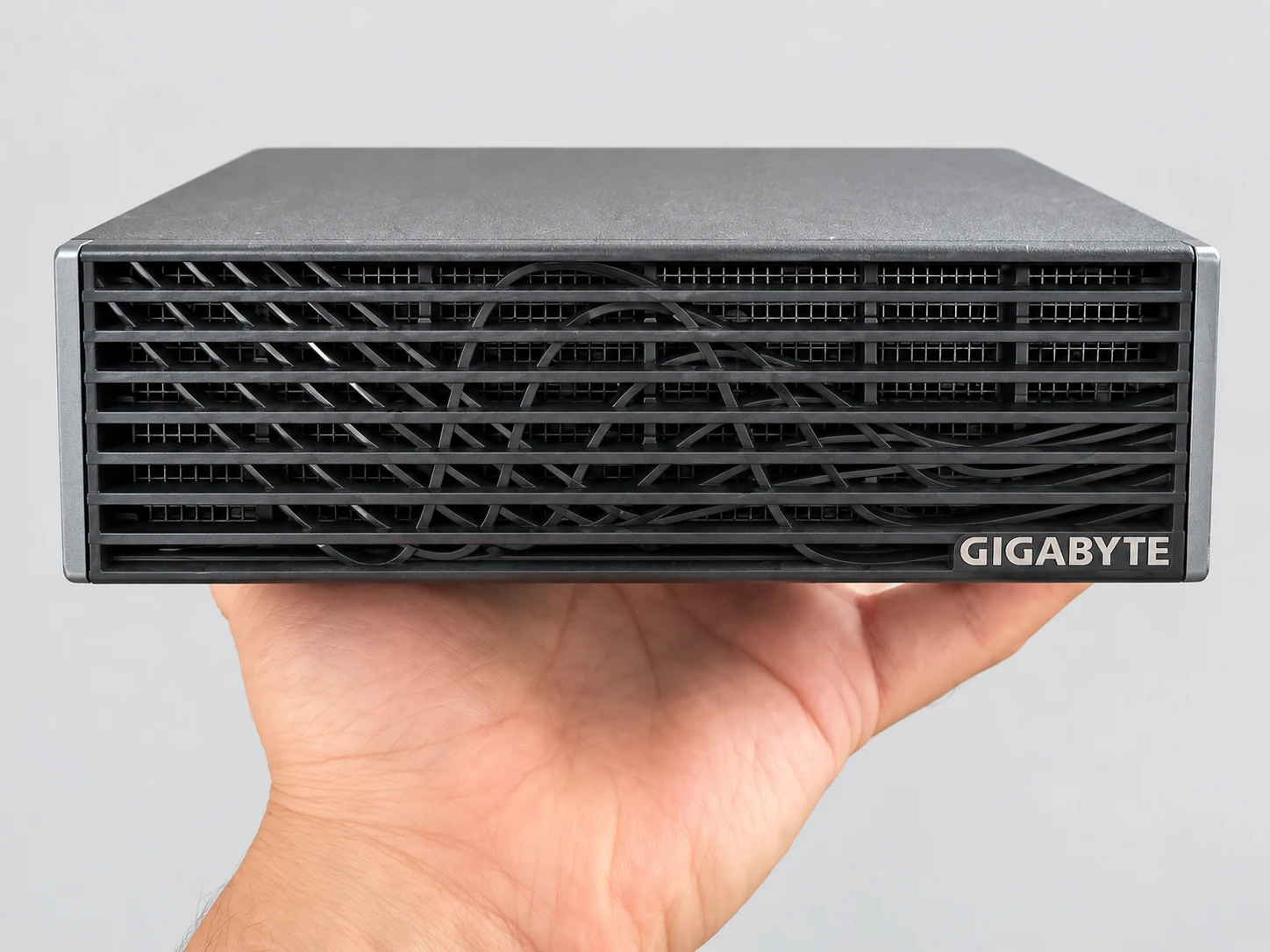
- A one-liter chassis (150 × 150 × 50.5 mm, 1.2 kg) powered by a 240 W USB-C adapter.
Let's separate the platform from the manufacturer. The NVIDIA GB10 chip, its 128 GB of unified memory at 273 GB/s, CUDA, and DGX OS 7.5.0 determine most of the training speed. For inference, our measurements are within 4.3% at most of those published for the DGX Spark; the training runs in this guide were performed on the AI TOP ATOM.
GIGABYTE provides the chassis and its two-fan cooling. During the 87 minutes of logging for the training run, at an average of 53 W on the GPU side, the temperature stayed at 65 °C on average and 77 °C at most, with no throttling reported.
Prices checked on October 8, 2026 for the ATAGB10-9001 (128 GB, 4 TB PCIe 4.0 SSD): €6,346.27 including tax at the official AORUS store, where it was sold out; it was in stock on Amazon.fr. We measured the ATAGB10-9000 model, whose SSD is PCIe 5.0. GB10 prices change every week: check them before you buy.
#FAQ
How long does it take to fine-tune an 8-billion-parameter model on a GB10?+
Can you fine-tune a 70B model or gpt-oss 120B on 128 GB?+
Can a small trained model really outperform a large model?+
How much does the electricity for a fine-tuning run cost?+
How do you use the adapter once training is finished?+
Do you need the 128 GB version of the ATOM for fine-tuning?+
Feedback, an error, or a clarification? Let us know—it improves the guide for everyone.