GB10 128 GB: which LLMs actually run (mesures)
On a GIGABYTE AI TOP ATOM (NVIDIA GB10, 128 GB), all 13 measured models, from 4B to 235B, fit with a 32,768-token context and at least 20 GB of headroom. Large MoE models, which activate only part of their parameters for each token, are much faster than dense models of the same size: gpt-oss 120B outputs 58 tokens per second. A 70B dense model outputs 4.8 tokens per second: memory bandwidth, not capacity, determines the speed.
One hundred twenty-eight gigabytes of unified memory: that is the advantage GB10 machines have over graphics cards. But what can you really load into it, with how much headroom and at what speed? We measured 13 models, from 4B to 235B, on an AI TOP ATOM graciously provided by GIGABYTE, using a protocol fixed before the first measurement. Here is what fits, what feels good for everyday use, and who should buy it.
#The tested machine
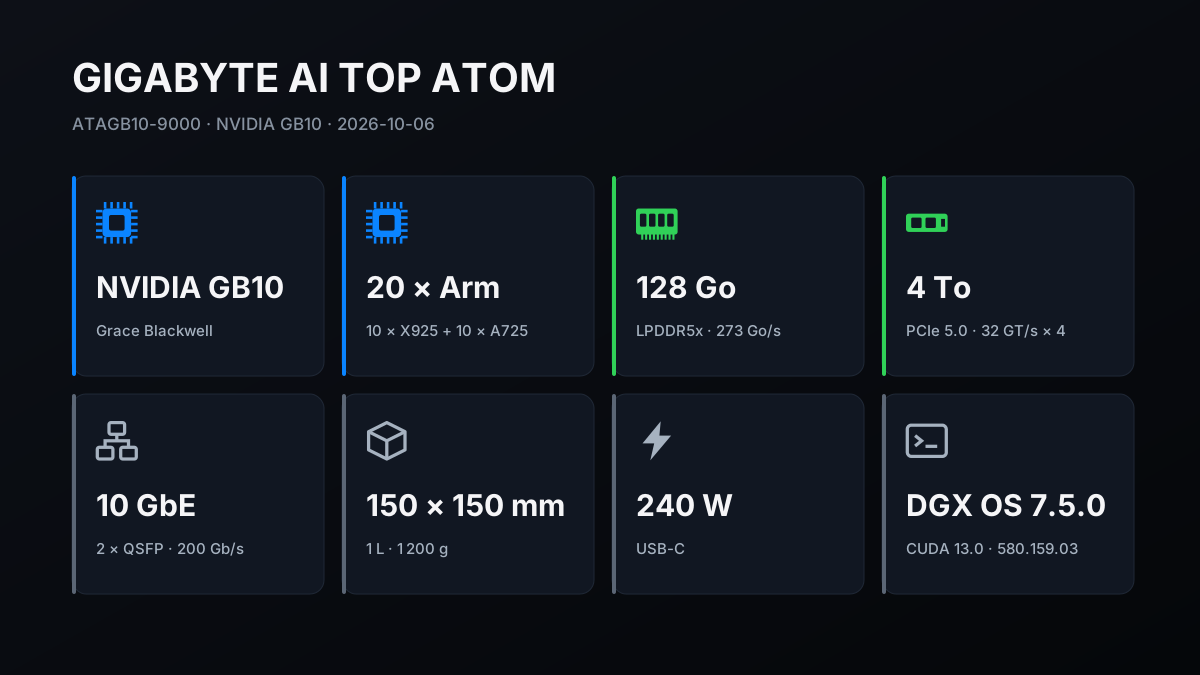
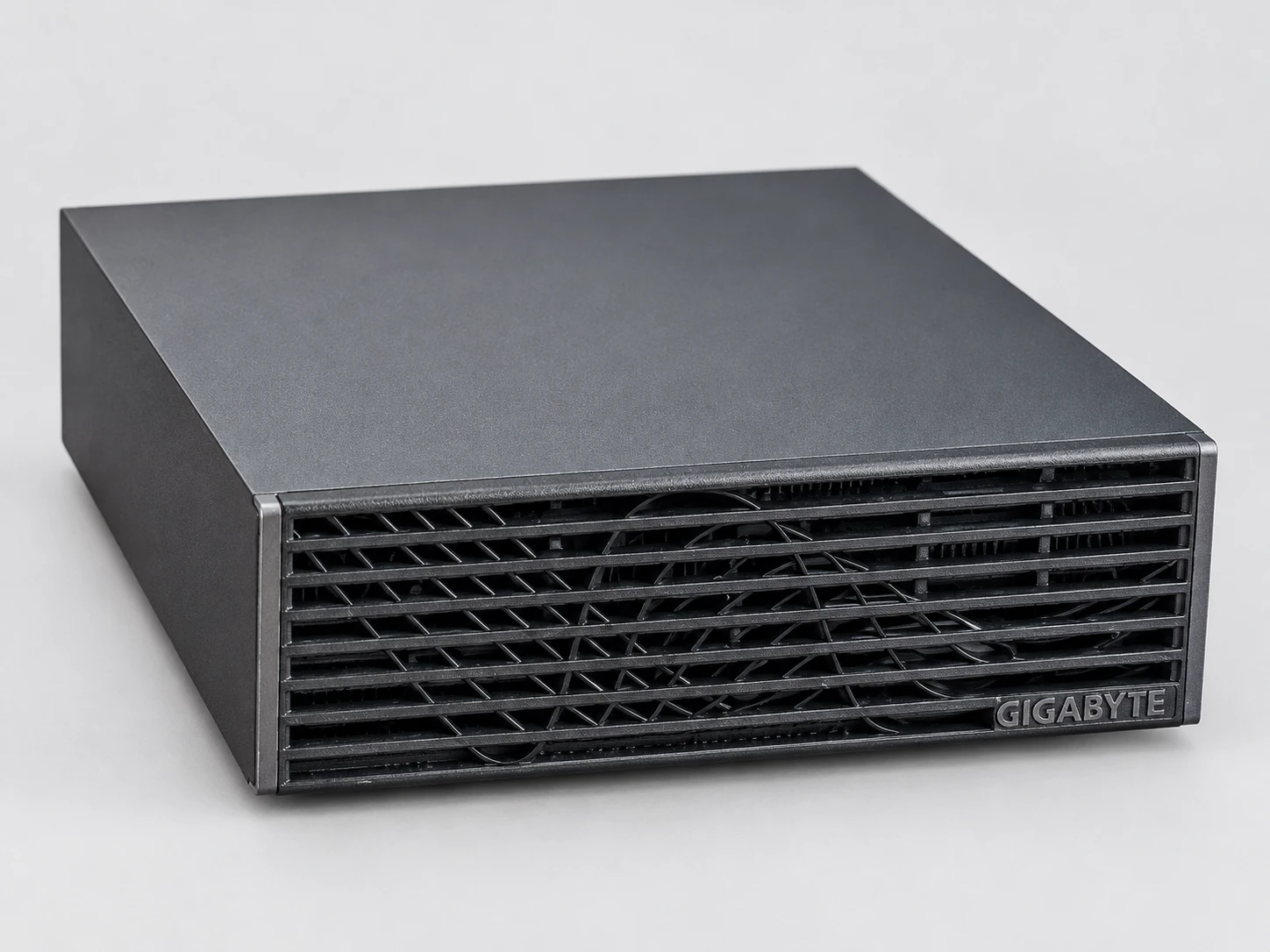
The machine is a GIGABYTE AI TOP ATOM, model ATAGB10-9000: NVIDIA GB10 chip (20 Arm cores and a Blackwell GPU sharing 128 GB of memory advertised at 273 GB/s), with a 4 TB PCIe 5.0 SSD. It runs DGX OS 7.5.0, the NVIDIA system based on Ubuntu (driver 580.159.03, CUDA 13.0).
Three software tools were used. llama.cpp, a widely used open-source engine for running models locally, compiled on-site for the GB10 chip, provides the main results table. Ollama 0.34.1 is used for comparison with a MacBook Pro M5 Max measured with the same version. vLLM 26.09, a server designed to serve multiple people simultaneously, runs in the container provided by NVIDIA.
#How we measured
The llama.cpp speeds come from five repetitions, with a standard deviation (the spread between repetitions) of at most 3%. Load times, reading a 30,000-token document, and memory headroom are single measurements; multi-user tests are repeated three times. Before the first measurement, a three-minute test verified that the GPU could sustain its compute power.
The files for the 13 models have a SHA-256 fingerprint (a digital signature for the file) identical to the one published by Hugging Face, the site that hosts these models. The protocol, written on October 5, was locked on the 6th at 13:30, before the first measurement.
An amendment issued the same day, around 16:50, moved the cold remeasurement to the evening and added the tests reproduced here: the official Ollama script, speculative decoding, sustained load, and Llama 3.3 70B in NVFP4. The method, file hashes, and data from our tables are published on our methodology page.
The main figures were remeasured cold that same evening, after 20 minutes of idle time and with the cache cleared: at most a 2.6% difference, below the protocol's 3% threshold.
#The same speed as a DGX Spark, within a few percent
To our knowledge, 128 GB GB10 machines share the same NVIDIA chip and the same memory; their construction, cooling, and storage may differ. To position the ATOM, we reran two published benchmarks for NVIDIA’s DGX Spark, using the same software version and settings.
With llama.cpp (build 7941, the one from the table published by the project; our main table uses the newer build 11430), across six common models, read performance is within 2.3%; write performance is 2.8% lower at the median and 4.3% lower at most. With the official Ollama script (version 0.12.6, the one used for its published measurements), our three measurements are within 2%, for both reading and writing: gpt-oss 20B, gpt-oss 120B, and Llama 3.1 70B.
These guide speeds should therefore hold, within a few percent, for the other 128 GB GB10 machines; we measured only the ATOM. Its construction and sustained-load behavior (temperatures, stability over 1 hour and 2 hours) are detailed in the next guide in the series, and its power consumption in a dedicated guide.
#13 models, from 4B to 235B: footprint and speed
The table summarizes the test run. “Memory used” is the drop in available memory once the model is loaded with 32,768 context tokens reserved. “Load time” is the cold-start loading time with the disk cache cleared. The speeds come from the llama-bench measurement tool (llama.cpp, build 11430 from October 5, 2026), first with an empty context and then with 32,768 tokens already present; actual times for a long document are lower.
| Model | Type | Memory usage | Chargement | Writing (empty → 32k) | Reading (empty → 32k) | Usage |
|---|---|---|---|---|---|---|
| Gemma 3 4B (Q4_0) | dense | 4.6 GB | 3 s | 80,8 → 63,6 | 6 239 → 5 409 | very smooth |
| Qwen2.5-Coder 7B (Q8_0) | dense | 10.2 GB | 3 s | 30,0 → 23,3 | 3 746 → 2 138 | fluide |
| gpt-oss 20B (MXFP4) | MoE, 3.6B active | 13.0 GB | 4 s | 81,4 → 62,5 | 4 950 → 3 316 | very smooth |
| Qwen3.8 27B (Q4_K_XL) | dense | 19.1 GB | 5 s | 11,8 → 10,6 | 865 → 717 | correct |
| Qwen3.6 35B-A3B (Q4_K_XL) | MoE, 3B active | 22.4 GB | 5 s | 66,0 → 55,6 | 2 987 → 2 429 | very smooth |
| GLM-4.7-Flash (Q8_0) | MoE, 3B active | 32.6 GB | 6 s | 51,4 → 35,5 | 2 392 → 608 | very smooth |
| Qwen3-Coder 30B-A3B (Q8_0) | MoE, 3.3B active | 34.3 GB | 6 s | 62,6 → 33,2 | 3 377 → 1 603 | very smooth |
| Llama 3.3 70B (Q4_K_M) | dense | 51.1 GB | 8 s | 4,8 → 3,9 | 405 → 269 | ideal for batch processing |
| gpt-oss 120B (MXFP4) | MoE, 5.1B active | 61,7 GB | 10 s | 58,0 → 42,2 | 2 609 → 1 832 | very smooth |
| Qwen3.5 122B-A10B (Q4_K_XL) | MoE, 10B active | 74.5 GB | 12 s | 23,1 → 21,4 | 1 126 → 945 | fluide |
| Nemotron-3 Super 120B-A12B (Q4_K_XL) | MoE, 12B active | 80.4 GB | 12 s | 16,9 → 16,5 | 851 → 809 | correct |
| Qwen3.8-Flash-Next 125B (IQ4_XS) | MoE, approximately 6B active | 89.5 GB | 21 s | 27,3 → 25,2 | 1 073 → 917 | fluide |
| Qwen3-235B-A22B (Q2_K_XL) | MoE, 22B active | 90.5 GB | 12 s | 17,7 → 11,8 | 588 → 331 | acceptable; heavy compression (Q2) |
To read the table: a dense model uses all its parameters for every token, while an MoE model (“mixture of experts”) uses only a fraction, indicated in billions (B). The acronym in parentheses refers to weight compression. In our files, Q8 uses 8.5 bits per parameter, Q4 and MXFP4 formats use 4.3 to 5.6 bits, and Q2_K_XL uses 3 bits: it is the strongest compression in the table.
The “Usage” column applies our guidelines to write speed with an empty context: very smooth above 40 tokens per second, smooth from 20 to 40, acceptable from 10 to 20. Below that, we reserve the model for batch processing.
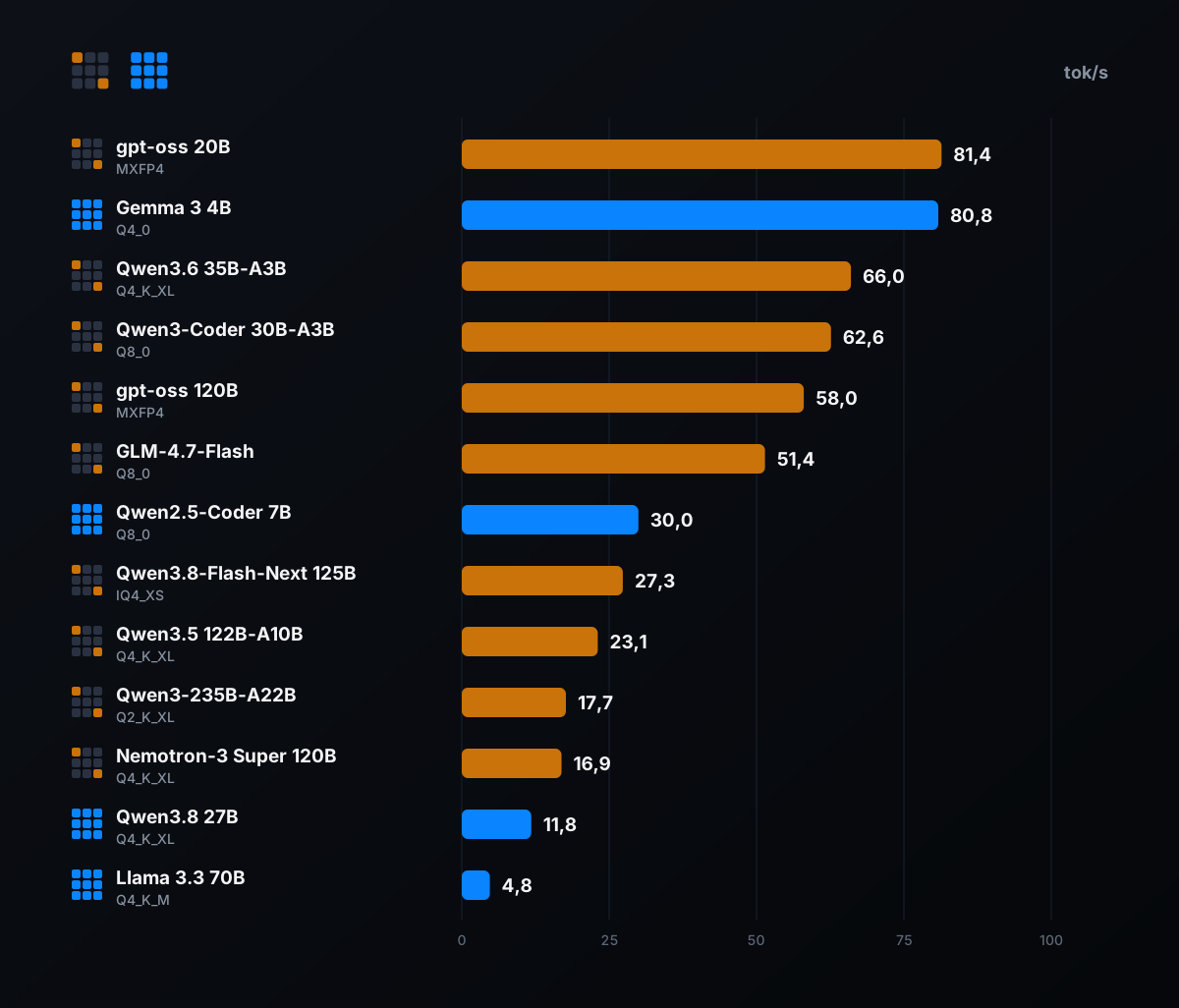
First takeaway: nothing in this table pushes the machine to its limits; even Qwen3-235B leaves 21 GB free with a 30,000-token context. Second takeaway, more useful for choosing: capacity is almost never the constraint; the model choice determines speed, from 4.8 to 81.4 tokens per second.
#What determines speed: active parameters, not size
To write each token, the chip must reread from memory the weights used for that token. With 273 GB/s of bandwidth, the maximum speed is easy to calculate: 273 divided by the amount of weights read for each token. A dense model reads all its weights every time; an MoE model reads only a fraction, the “experts” selected for that token.
That explains the table's paradox. The gpt-oss 120B file weighs 59 GB, but the model activates only 5.1 billion parameters per token, so it generates at 58.0 tokens per second. Qwen3.8 27B, whose file is more than three times lighter (16 GB), is a dense model: it activates all 27 billion parameters for every token and generates at 11.8 tokens per second. The larger model is nearly five times faster than the smaller one.
| Model | Active parameters | Theoretical ceiling | Measured | Share of the cap |
|---|---|---|---|---|
| Qwen2.5-Coder 7B (dense) | 7.6B | 33,7 | 30,0 | 89 % |
| Llama 3.3 70B (dense) | 70.6B | 6,4 | 4,8 | 74 % |
| Qwen3.8 27B (dense) | 27.3B | 15,6 | 11,8 | 76 % |
| Qwen3-Coder 30B-A3B (MoE) | 3.3B | 77,8 | 62,6 | 81 % |
| gpt-oss 120B (MoE) | 5.1B | 98,7 | 58,0 | 59 % |
| Qwen3.6 35B-A3B (MoE) | 3B | 141,1 | 66,0 | 47 % |
The table includes six models, those whose active parameter count is published or reported by llama.cpp. Dense models reach 74 to 89% of that ceiling: the GB10 makes use of almost all its memory.
Across all thirteen models, the eight MoE models other than Qwen3.8-Flash-Next reach 47% to 81%, with six of them between 52% and 62%; selecting experts and performing auxiliary computations probably adds a fixed amount of time to each token. Qwen3.8-Flash-Next is excluded from this calculation: it has 51 billion additional lookup-table parameters on top of its 125 billion, making the estimate unsuitable.
At comparable sizes, MoE models are still much faster. Hence our main recommendation: on a GB10 machine, favor an MoE for a large model. A small dense model such as Gemma 3 4B also writes very quickly (80.8 tokens per second), but it is much smaller and serves different use cases.
#Models with more than 100 billion parameters
That's the purpose of 128 GB. NVIDIA advertises models of up to 200 billion parameters for the platform; our measurements confirm that claim, and a compressed 235B at 3 bits even fits beyond that. Five models with more than 100 billion parameters fit on the ATOM, all with at least 20 GB of headroom at a 30,000-token context.
- gpt-oss 120B, the best speed-to-footprint compromise
- 58.0 tokens per second, using 61.7 GB with its context, loaded in 10 seconds. OpenAI publishes it directly in MXFP4 format: it fits without additional compression.
- Qwen3.8-Flash-Next 125B, the fastest of the giant Qwen models
- 27.3 tokens per second with approximately 6 billion active parameters, occupying 89.5 GB in IQ4_XS. Its less-compressed Q4_K_XL version also fits, but with a narrow margin (see below).
- Qwen3.5 122B-A10B
- 23.1 tokens per second, 74.5 GB; its ten billion active parameters place it behind gpt-oss.
- Nemotron-3 Super 120B-A12B (NVIDIA)
- 16.9 tokens per second, 80.4 GB. With twelve billion active parameters, it writes more slowly than gpt-oss, and it is the model whose writing holds up best as the context grows: 16.5 at 32,768 tokens, about 3% less.
- Qwen3-235B-A22B, separately
- It fits in Q2_K_XL, the table's strongest compression (3 bits per parameter on average): 17.7 tokens per second, 90.5 GB. Such strong compression generally reduces response quality; we did not measure it.
#Where memory runs out: around 100 to 105 GB of weights
The system sees 121.7 GB of memory: some of the 128 GB is reserved at startup. Once the machine was running, with nothing else in memory, 108 to 113 GB remained available depending on the time. To find the ceiling, we loaded two heavier versions of the largest models, with the same 32,768-token context and a safeguard that stops loading if free memory falls below 3 GB.
| Model | File | Memory usage | Remaining headroom | Writing (after reading 4,000 → 30,000 tokens) | Place |
|---|---|---|---|---|---|
| Qwen3.8-Flash-Next 125B (Q4_K_XL) | 103.7 GB | 107.0 GB | 6.0 GB | 24.9 → 21.9 tok/s | just |
| Qwen3-235B-A22B (Q3_K_XL, 3.5 bits) | 97.0 GB | 104.7 GB | 8.2 GB | 13.9 → 10.4 tok/s | just |
No model failed to load, but these two leave little headroom: barely enough room for a second model, a much longer context, or a demanding application running alongside them. The practical limit is therefore around 100 to 105 GB of weights. This excludes, for example, Qwen3.8-Flash-Next's NVFP4 weights (a compressed format from NVIDIA): about 135 GB according to the Kubesimplify blog (August 27, 2026), which notes that two machines are then required.
That same post had already shown the model running on a single machine in GGUF (the llama.cpp format), but only the most compressed version existed at the time. On the ATOM, the IQ4_XS and Q4_K_XL versions run, with 21 and 6 GB of headroom.
#The cost of long context
A long document, a codebase, or a conversation that keeps going: every token already present in the context slows down what follows. With 32,768 tokens in memory, writing speed drops by 3 to 47% depending on the model. We also measured the real-time needed to read a 30,000-token document in one block, about fifty pages.
| Model | Reading 30,000 tokens | Writing afterward |
|---|---|---|
| Gemma 3 4B | 4,7 s | 60.8 tok/s |
| gpt-oss 20B | 8,1 s | 61.6 tok/s |
| Qwen2.5-Coder 7B | 12,7 s | 23.3 tok/s |
| Qwen3.6 35B-A3B | 14,2 s | 54.4 tok/s |
| Qwen3-Coder 30B-A3B | 17,4 s | 33.3 tok/s |
| gpt-oss 120B | 21,8 s | 42.8 tok/s |
| GLM-4.7-Flash | 32,7 s | 35.6 tok/s |
| Qwen3.8 27B | 39,4 s | 10.6 tok/s |
| Qwen3.8-Flash-Next 125B | 42,9 s | 23.0 tok/s |
| Qwen3.5 122B-A10B | 43,6 s | 21.2 tok/s |
| Nemotron-3 Super 120B-A12B | 55,4 s | 16.2 tok/s |
| Qwen3-235B-A22B | 1 min 33 sec | 12.1 tok/s |
| Llama 3.3 70B | 1 min 44 sec | 4.0 tok/s |
For most models, these times are longer than the « Read » column in the first table suggests. The likely reason: llama-server, the server used in practice, processes text in batches of 512 tokens by default, versus 2 048 in our llama-bench configuration.
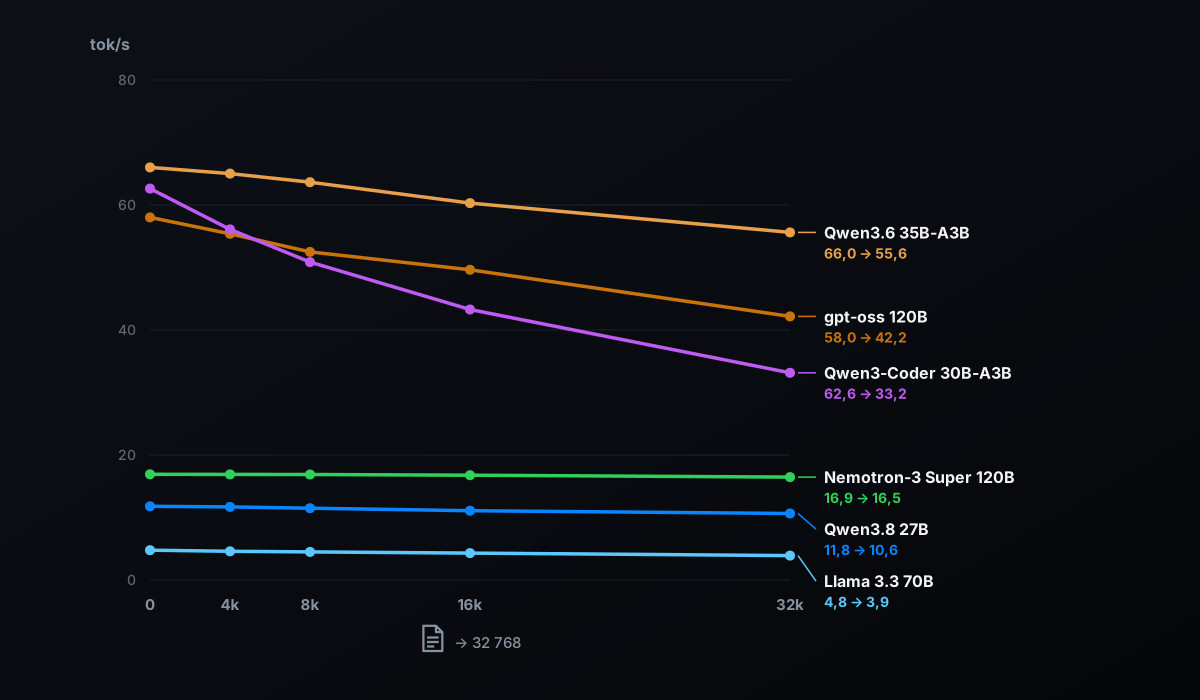
Reading is a strong point for the GB10: compared with the Mac tested below, it reads gpt-oss 120B 31% faster. If you submit a report of around fifty pages, the response starts 22 seconds later with gpt-oss 120B, and 1 min 44 sec later with a dense 70B model. This criterion carries significant weight for document analysis and coding agents.
#Up to 16 concurrent users: what the machine can handle
With vLLM, we simulated 1, 8, and then 16 concurrent users. Each sends a request for 1,024 tokens and receives a response of 512 tokens; each point is measured three times with different requests, and we publish the median.
| Model | Users | Total | Per person | First token (average) | First token (slowest cases) |
|---|---|---|---|---|---|
| gpt-oss 120B | 1 | 35.6 tok/s | 36.4 tok/s | 0,34 s | 0,35 s |
| gpt-oss 120B | 8 | 113.9 tok/s | 14.5 tok/s | 0,97 s | 1,62 s |
| gpt-oss 120B | 16 | 160.3 tok/s | 10.2 tok/s | 1,07 s | 3,71 s |
| gpt-oss 20B | 1 | 49.1 tok/s | 50.0 tok/s | 0,16 s | 0,16 s |
| gpt-oss 20B | 8 | 205.9 tok/s | 26.5 tok/s | 0,49 s | 0,81 s |
| gpt-oss 20B | 16 | 322.4 tok/s | 20.7 tok/s | 0,52 s | 1,73 s |
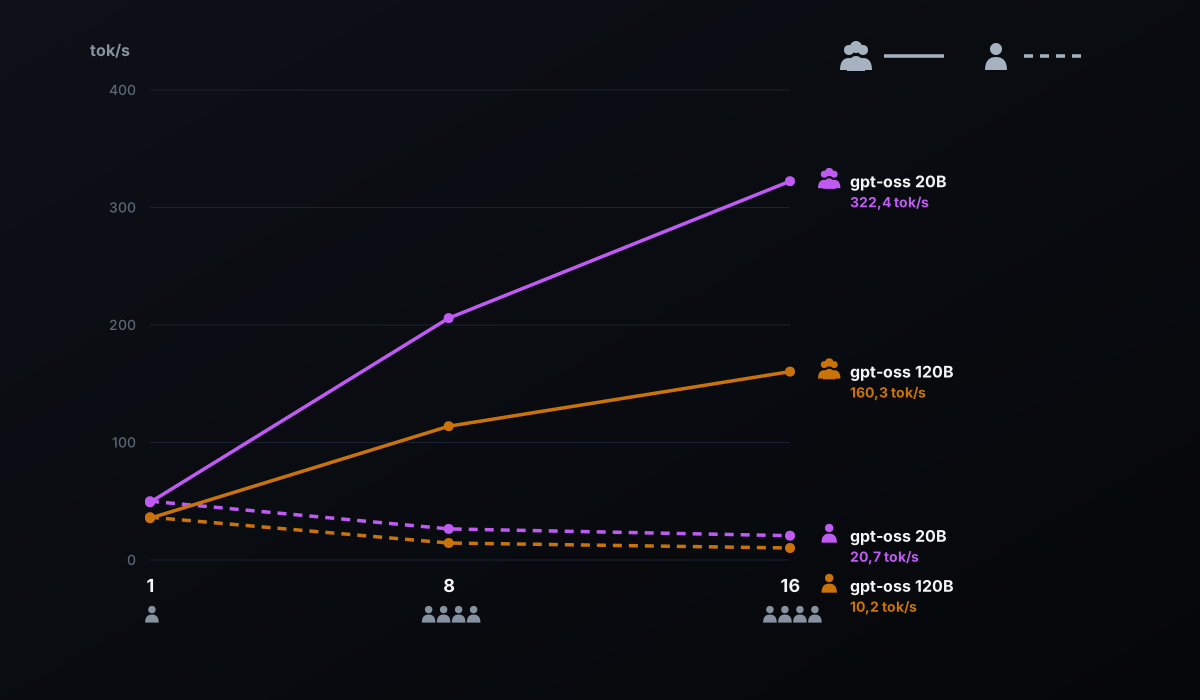
Between 1 and 16 users, total throughput is multiplied by 4.5 with gpt-oss 120B and by 6.6 with gpt-oss 20B: when several requests share the reading of the same weights, the chip fully leverages its computing power.
With 16 people, each person still sees their response being generated at 10 tokens per second with gpt-oss 120B, and at 21 with gpt-oss 20B. With the 120-billion-parameter model, the first word arrives in just over one second on average, and in nearly 4 seconds in the slowest cases.
For a single person, however, vLLM isn't the fastest: without performance tuning, it generates 36.4 tokens per second on gpt-oss 120B, compared with 54.4 for llama.cpp on long responses. Its logs show that on the GB10 it selects the Marlin compute kernel for the MXFP4 format, which probably explains the difference. vLLM makes sense as soon as multiple people or agents share the machine.
#Alone at the machine: Ollama or llama.cpp?
Ollama is the simplest way to get started, and it runs on the GB10 without configuration. On gpt-oss, however, it is not the fastest. For long responses, version 0.34.1 writes at 42.3 tokens per second on gpt-oss 120B, compared with 54.4 for llama.cpp in the same MXFP4 format, or 22% less. On gpt-oss 20B: 58.8 versus 78.8, or 25% less.
With Qwen models, it's the opposite. On Qwen3.8 27B, Ollama writes between 22,9 and 30,5 tokens per second depending on the passage, versus 11,8 for llama.cpp with its default settings; on Qwen3.6 35B-A3B, between 90,5 and 94,9, versus 66,0. The likely reason: Ollama enables speculative decoding by default, proposing several tokens ahead that the model validates all at once (the draft_num_predict setting appears in these models' configuration).
Our test points in the same direction. On llama-server (six 400-token texts, prose and code), llama.cpp's speculative decoding (MTP, which predicts several tokens at once) takes Qwen3.8 27B from 11.7 to 21.5 tokens per second in prose, and from 11.6 to 27.2 in code.
In practice: Ollama to get started and for Qwen models, which it accelerates out of the box; llama.cpp to get the most out of gpt-oss, or Qwen3.8 with speculative decoding enabled. The best choice depends more on the settings than the machine.
#Compared with the MacBook Pro M5 Max 128 GB
A reader measured their 128 GB MacBook Pro M5 Max (40-core GPU) on September 16 with Ollama 0.34.1, using a single pass per model; their measurements are published in our dedicated guide. We reran the same series on the ATOM, using two passes: the same version of Ollama, the same models, and the same prompt.
| Metric | ATOM, 1st pass | ATOM, 2nd pass | MacBook Pro M5 Max | Gap |
|---|---|---|---|---|
| Writing, gemma4:12b | 45,9 | 54,1 | 58,1 | Mac +7 to +27% |
| Writing, qwen3.8:27b | 30,5 | 22,9 | 36,6 | Mac +20 to +59% |
| Writing, gpt-oss:20b | 58,1 | 58,8 | 113,4 | Mac +93 to +95% |
| Writing, gpt-oss:120b | 42,2 | 42,3 | 79,1 | Mac +87% |
| Reading, gpt-oss:120b | 1 816 | — | 1 388 | ATOM +31% |
The Mac writes faster on all four models, nearly twice as fast on the two gpt-oss models, whose runs agree: its chip has 614 GB/s of bandwidth, more than twice that of the GB10. On gemma4 and qwen3.8, the gap varies from one run to another; speculative decoding, whose gain depends on the generated text, is one possible explanation.
The ATOM reads faster, probably thanks to its GPU’s computing power, on similar but non-identical texts (16,850 and 16,689 tokens). With llama.cpp, the generation gap narrows: 54.4 tokens per second on gpt-oss 120B, versus 79.1 on the Mac under Ollama.
#Who ATOM is the right choice for
The following is based on our measurements on the ATOM.
- ATOM is the right choice if you want large models at home
- Five models with more than 100 billion parameters fit comfortably. To our knowledge, no consumer graphics card comes close to this 128 GB.
- … if you work with long documents or code
- 30,000 tokens read in 22 seconds with gpt-oss 120B.
- … if several people or agents share it
- 160 tokens per second total for 16 users on gpt-oss 120B.
- … if you want the NVIDIA ecosystem
- CUDA 13, vLLM in the NVIDIA container, and llama.cpp compiled for the GB10 chip worked for us on DGX OS 7.5.0.
- If you're alone and primarily want writing speed
- Compare this with the MacBook Pro M5 Max: thanks to its 614 GB/s, it writes faster with gpt-oss, while the ATOM reads a long document 31% faster on gpt-oss 120B. Compare the prices too.
- If your models stay under 35 GB
- The 64 GB version of the ATOM, announced for October 23, 2026, should be sufficient (calculation based on our measurements, not measured on this version).
#64 or 128 GB?
On October 2, 2026, NVIDIA announced 64 GB DGX Spark systems for models of up to 100 billion parameters, available on October 23 from Acer, ASUS, Dell, GIGABYTE, HP, and MSI, starting at $4,999. GIGABYTE confirmed an AI TOP ATOM 64 GB with the same design on October 5. We have not measured it.
Our measurements allow a calculation. Models up to Qwen3-Coder 30B-A3B take up less than 35 GB with 32,768 tokens of context and would fit; Llama 3.3 70B (51 GB) would be borderline. gpt-oss 120B (62 GB) and larger models would not fit. At equal bandwidth, which still needs to be verified, speeds should be close.
For a model with more than 100 billion parameters on a single machine, the 128 GB version is the clear choice. According to NVIDIA, two 64 GB machines connected together can also pool their memory; we have not tested this.
#The prices recorded
On October 8, 2026, the 4 TB PCIe 4.0 version (ATAGB10-9001, same GB10 chip and same 128 GB) was listed at €6,346.27 including tax on the official AORUS store, sold out; it was in stock on Amazon.fr, sold by Amazon UK (one unit). The tested version, 4 TB PCIe 5.0 (ATAGB10-9000), was priced at €7,999.95 at LDLC and Materiel.net, out of stock.
Prices and stock for these machines change quickly: check them before buying.
#Our verdict
The ATOM is an excellent choice for running a 120-billion-parameter model at home, sharing it with a team, or quickly reading long documents. It delivered the platform’s reference performance, with no thermal throttling reported in our measurements, including during an hour of continuous load with 16 users. If budget matters, its PCIe 4.0 version retains the same chip and memory.
#What we did not measure
- Response quality
- This guide measures what fits and how fast it runs, not how good each model is.
- Temperatures, noise, and power consumption
- The next guide in the series covers temperatures under sustained load; power consumption has its own guide, measured at the chip (GPU only). For noise, we cite measurements from Hardware & Co.
- Contexts beyond 32,768 tokens
- Several models support much longer contexts; this guide stops at 32 768 tokens, and the series' 70B tutorial goes up to 131 072 tokens for Llama 3.3 70B and gpt-oss 120B.
- The other GB10 machines and the 64 GB version
- Our figures match those published for the NVIDIA DGX Spark, but we measured only the 128 GB ATOM.
Updates and fixes: this page will be revised if a new version of DGX OS, llama.cpp, or Ollama changes these results; each correction will be dated.
#FAQ
What is the largest model you can run on a 128 GB GB10 machine?+
Can a 70B model be used daily on a GB10?+
Do this guide's speeds apply to a NVIDIA DGX Spark or another brand?+
Should you choose the 64 GB or 128 GB version?+
Is Ollama the Best Choice on a GB10 Machine?+
Feedback, an error, or a clarification? Let us know—it improves the guide for everyone.