MacBook Pro M5 Max 128 GB: real-world local AI measurements (benchmark 2026)
A MacBook Pro M5 Max with 40 GPU cores and 128 GB of unified memory, a protocol written in advance, six models, and a 16,689-token document: here are the first public measurements of the largest Apple laptop for local AI. The measurements were conducted by Joël Ramat, a cybersecurity and GRC consultant, on his own machine, at our request and according to our protocol. All figures are raw outputs from Ollama, with no edits.
Choosing a machine? Our picks by budget →
Buying alternative for this guide: GMKtec EVO-X2 — Amazon may show another configuration; check before buying.
A mini PC is a complete machine: check the available memory and engine compatibility. It does not replace macOS/MLX or CUDA.
Compare all options by budget, from €800 to €3,500 →
On the go: which laptop for local AI →
Affiliate links — commission possible at no extra cost to you. As an Amazon Associate, BestLLMfor earns from qualifying purchases.
Amazon may redirect you to a local store or show another configuration. Check the listing before buying; this link does not guarantee the destination or configuration.
#The machine and the protocol
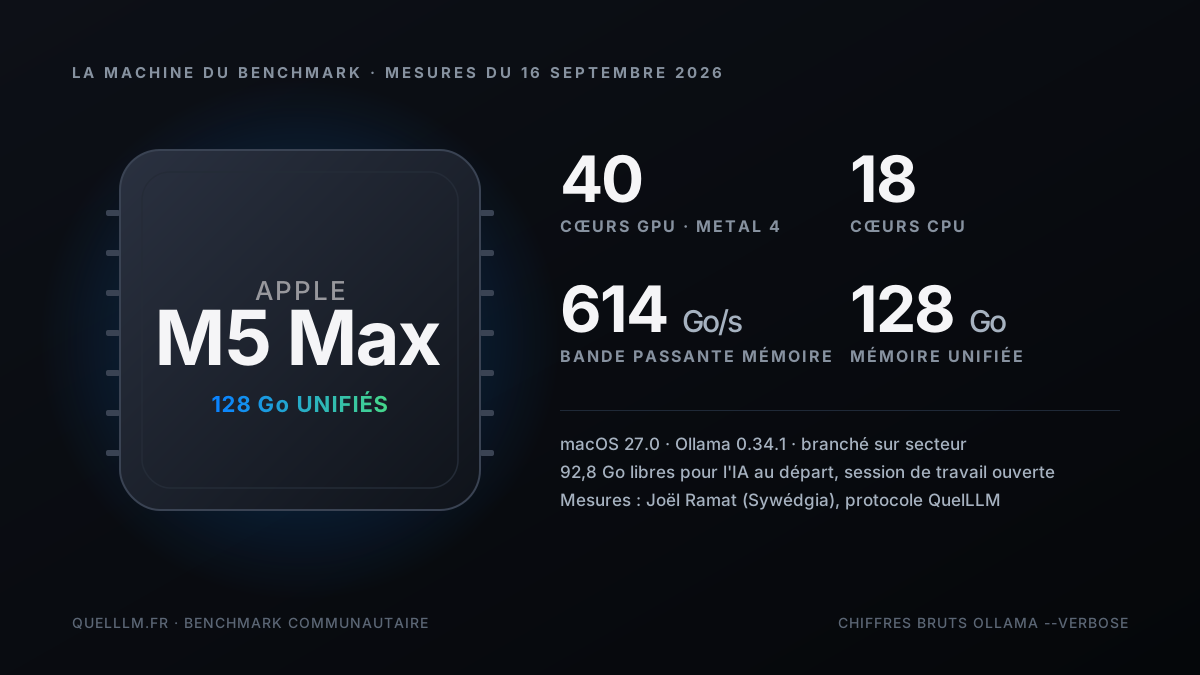
The machine is a 16-inch MacBook Pro with the full M5 Max chip: 18 CPU cores, 40 GPU cores, and 128 GB of unified memory advertised at 614 GB/s. It runs macOS 27.0 with Ollama 0.34.1. No system settings were changed: the GPU memory limit is the default, which matters when comparing it with your own Mac.
The protocol comes down to four rules, and they're not decorative. Keep the Mac plugged in, because macOS throttles the chip on battery power. Close demanding applications. Load only one model at a time. And above all, use the same prompt for every series—the one that makes the numbers comparable across models and, tomorrow, across machines.
- Series A, the two reference points
- Gemma 4 12B and Qwen 3.8 27B in GGUF, two models that also run on much more modest Macs. They place the machine on a familiar scale.
- B series, MLX versus GGUF
- The same Qwen 3.8 27B, with the same weights, served by the MLX engine from Ollama instead of llama.cpp. Only the engine changes.
- C series: the real issue at the 128 GB tier
- gpt-oss 120B, 65 GB, a model that simply doesn't fit in a laptop PC.
- D series, prefill under real-world load
- A 16,689-token document sent as a single block to gpt-oss 120B, with a summarization instruction. This is the campaign's only significant prefill measurement.
- Two off-protocol bonuses
- Joël already had Qwen 3.6 35B-A3B in MLX and gpt-oss 20B on his machine. He measured them under the same conditions.
#All figures in one table
Benefit from our experience and a guided path to choose the right tools for your Mac and use your AI every day.
- Lifetime online access
- PDF + files
- Refunded within 30 days
Here are the raw outputs of the ollama run --verbose command, as Joël copied them after each measurement. Each model produced a complete response to the 300-word prompt, in reasoning mode when the model supports it, which explains the 1,400 to 3,200 tokens generated for 300 words of final text.
| Model | Engine | Weights | Generation | Generated tokens | Total duration |
|---|---|---|---|---|---|
| Gemma 4 12B | GGUF Q4 | 7.6 GB | 58.1 tok/s | 1 390 | 24 s |
| Qwen 3.8 27B | GGUF Q4 | 17 GB | 36.6 tok/s | 2 517 | 69 s |
| Qwen 3.8 27B | MLX | 18 GB | 68.0 tok/s | 2 103 | 31 s |
| Qwen 3.6 35B-A3B (bonus) | MLX | 23 GB | 167.2 tok/s | 3 205 | 19 s |
| gpt-oss 20B (bonus) | MXFP4 | 13 GB | 113.4 tok/s | 2 199 | 19 s |
| gpt-oss 120B | MXFP4 | 65 GB | 79.1 tok/s | 669 | 8,5 s |
| gpt-oss 120B, run 1 | MXFP4 | 65 GB | 77.5 tok/s | 732 | 12,5 s |
| gpt-oss 120B, rerun 2 | MXFP4 | 65 GB | 75.5 tok/s | 1 707 | 22,7 s |
| gpt-oss 120B, D series | MXFP4 | 65 GB | 67.6 tok/s | 2 584 | 50 s |
| Series | Prompt tokens | Prefill | Time to first token |
|---|---|---|---|
| A, B, C (short prompt) | 43 à 98 | 31 to 346 tok/s | 0.1 to 0.9 s: startup latency, not throughput |
| D, 16,689-token document | 16 689 | 1,388 tok/s | 12,0 s |
#Generation: six models, one read
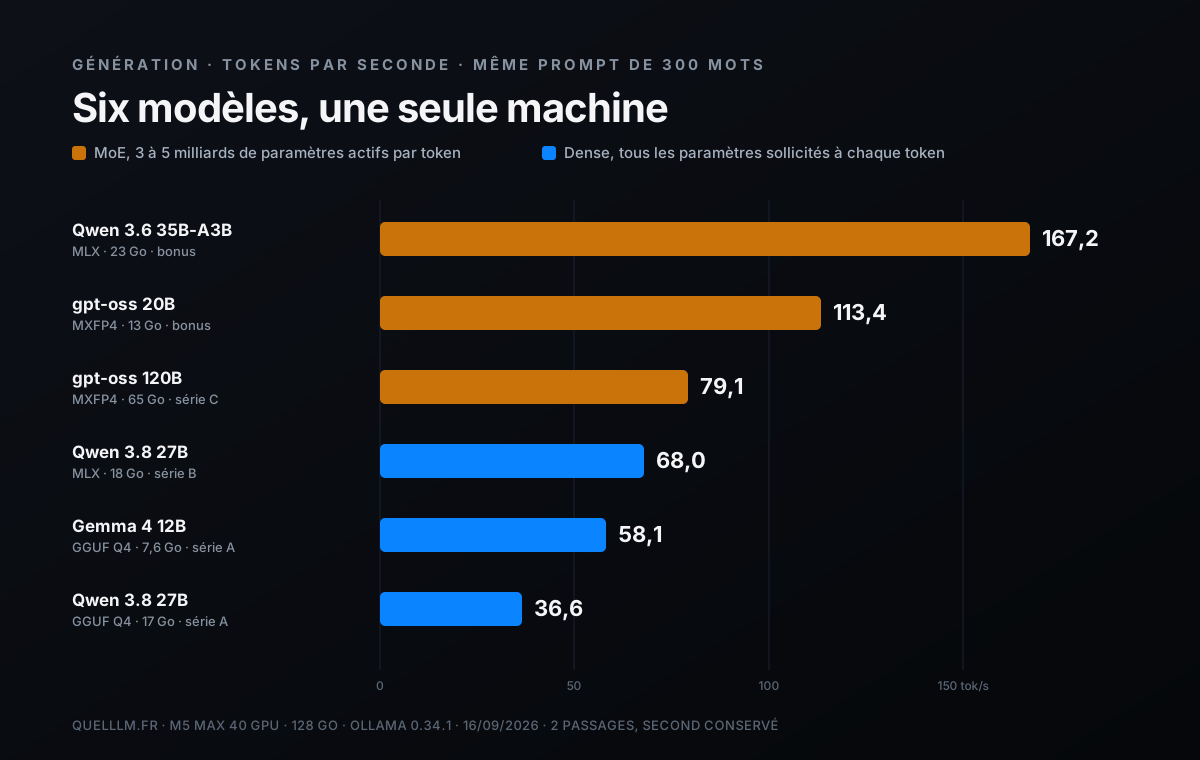
Read naively, this ranking is absurd: a 120-billion-parameter model at 79 tokens per second, twice as fast as a 27B in GGUF. The explanation is three letters. gpt-oss 120B, gpt-oss 20B, and Qwen 3.6 35B-A3B are mixture-of-experts models, or MoE. For each token, only a fraction of the parameters is used: about 5 billion for gpt-oss 120B, 3.6 billion for gpt-oss 20B, and 3 billion for Qwen. Generation speed depends on what moves through memory at each token, not on what is sitting idle there.
Dense models, Gemma 4 12B and Qwen 3.8 27B, use all their parameters for every token. Their speed therefore follows memory bandwidth divided by model weight: this has been the rule for Macs since the M1, and the M5 Max is no exception. On this machine, a 27B dense model in GGUF runs at 37 tokens per second, and a 12B model at 58.
- 167 tok/s on Qwen 3.6 35B-A3B with MLX
- The campaign’s highest score, on the model that combines both accelerators: MoE architecture and the MLX engine. It has the speed of a small 8B model, with the knowledge of a 35B model.
- 113 tok/s on gpt-oss 20B
- The best balance of speed, quality, and size for everyday assistant use: 13 GB, with a 2,200-token response in 19 seconds.
- 79 tok/s on gpt-oss 120B
- The most capable model on the list, running at twice human reading speed. This is the result that justifies the 128 GB tier; we’ll return to it below.
- 58 and 37 tok/s on dense models
- Gemma 4 12B and Qwen 3.8 27B in GGUF: comfortable, but unsurprising. They are in the same ballpark as on an M4 Max, since bandwidth changed little between the two generations.
#MLX versus GGUF, all else equal
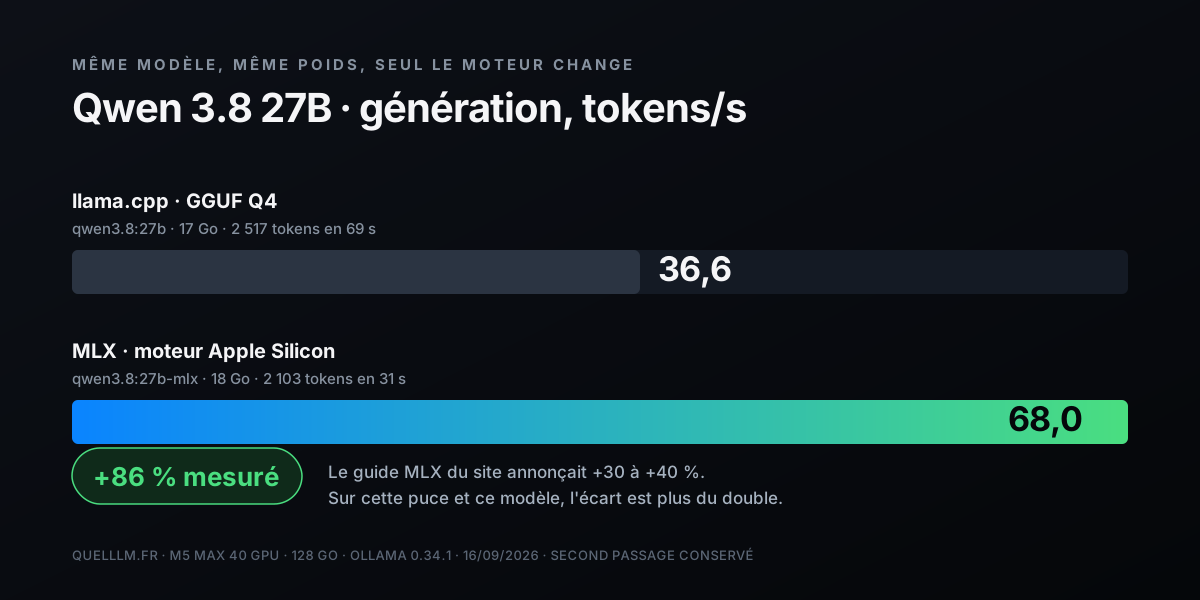
Everyone claims that MLX, the Apple library optimized for Apple Silicon, is faster than llama.cpp. Very few people measure it under strictly identical conditions, using the same model, on the same day, on the same machine. That's what Series B does: Qwen 3.8 27B in GGUF Q4 at 36.6 tokens per second, then Qwen 3.8 27B in MLX at 68.0 tokens per second. 86% faster.
Our guide to MLX and the M5 Mac announced a 30 to 40% gain in generation speed. On the M5 Max and this model, the reality is more than double. Some of the gap likely comes from MLX optimizations specific to the M5 generation and the neural accelerators built into the GPU; we can't yet isolate their contribution. What we can say is that on a recent Mac, running a dense model in GGUF when an MLX version exists is like leaving half the machine in the garage.
#What 128 GB actually buys you
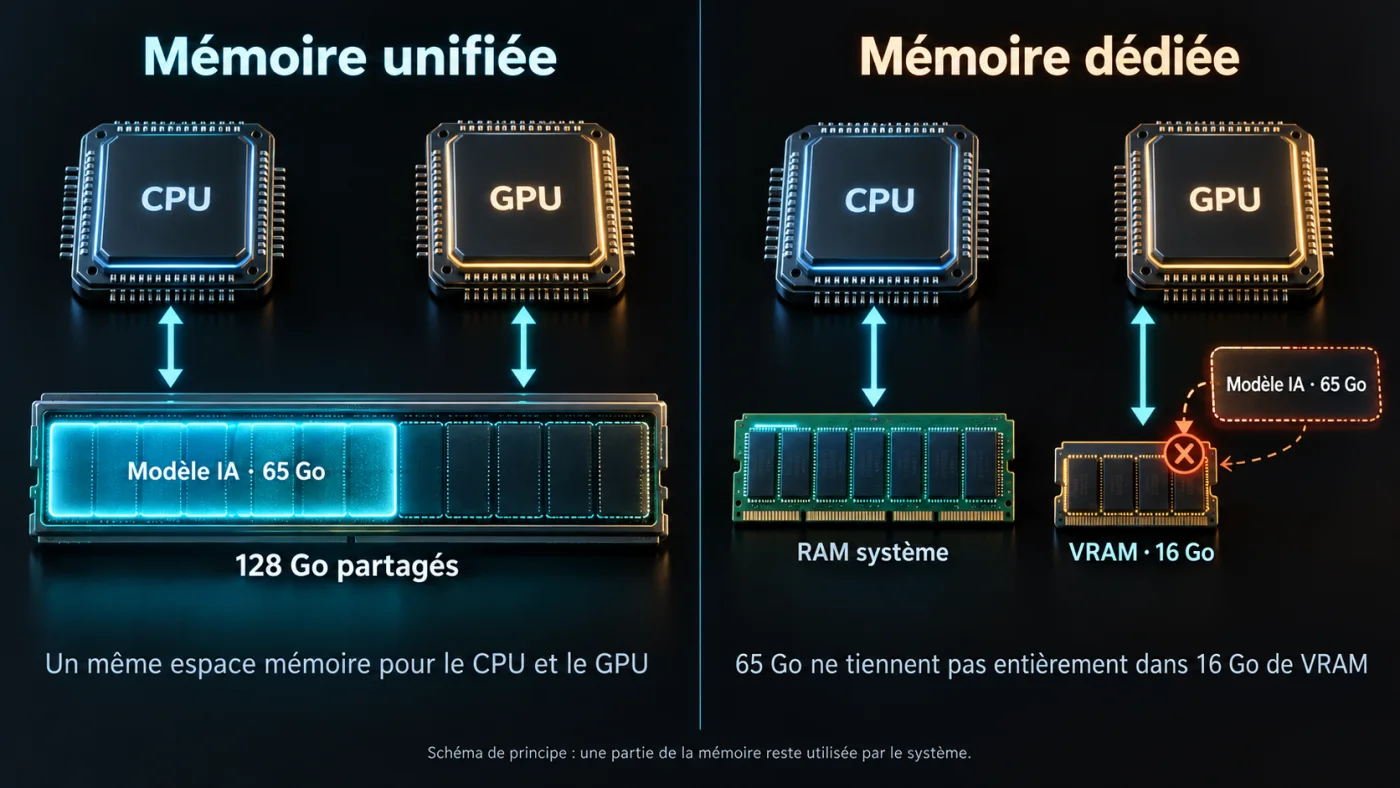
The real issue with the 128 GB tier is not speed, but what fits. gpt-oss 120B weighs 65 GB in MXFP4. No PC laptop can run it on the GPU: mobile cards top out at 16 or 24 GB of VRAM. On the 128 GB M5 Max, it loads, responds at between 75 and 79 tokens per second across three runs, and still leaves room.
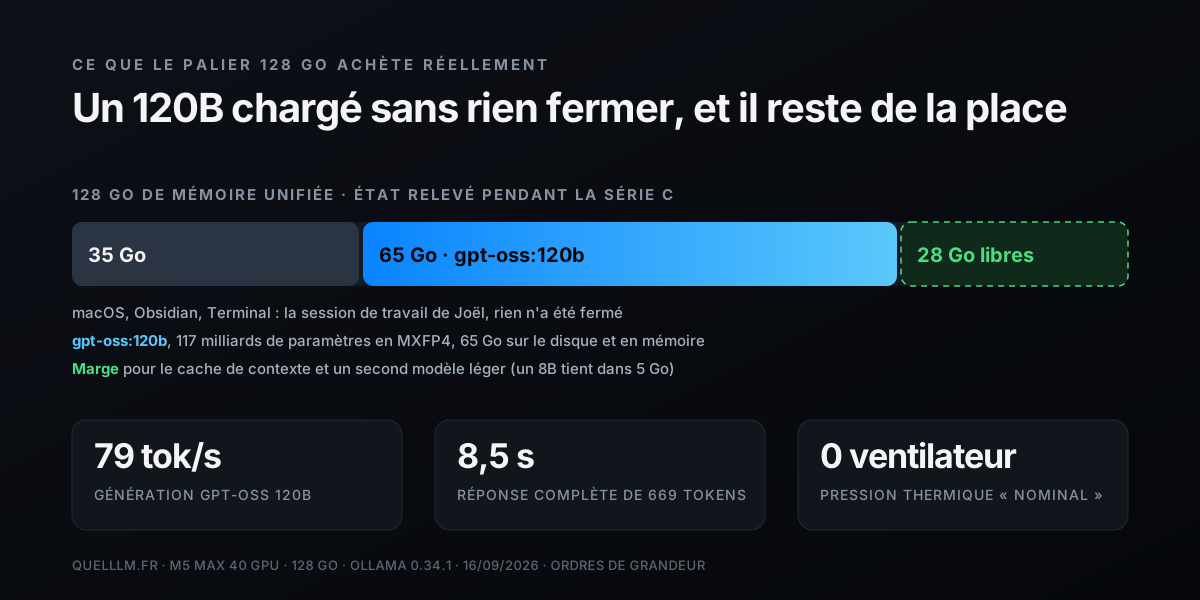
The memory report taken before the run is telling: 35 GB occupied by macOS and the work-session applications, with 93 GB available for AI. The 120B fits with about thirty gigabytes to spare, enough to handle a long context and a second lightweight model in parallel, such as an 8B for code autocompletion. On an M5 Max 64 GB, the same model does not load at all; on 96 GB it runs, but with no room left for anything else.
- 8.5 to 22.7 seconds
- Total duration of gpt-oss 120B's response to the 300-word prompt, over three runs: 669, 732, then 1 707 tokens produced. The speed barely changes (79.1, 77.5, and 75.5 tokens per second); the reasoning length varies from one run to the next, depending on whether the model decides to count its words one by one.
- 50 seconds
- Series D duration: reading a 16,689-token document, then writing a ten-bullet summary of 2,584 tokens.
- “Nominal” thermal pressure
- Measured after each series. No audible fan noise throughout the entire campaign, including 120B.
#Prefill, the number nobody publishes
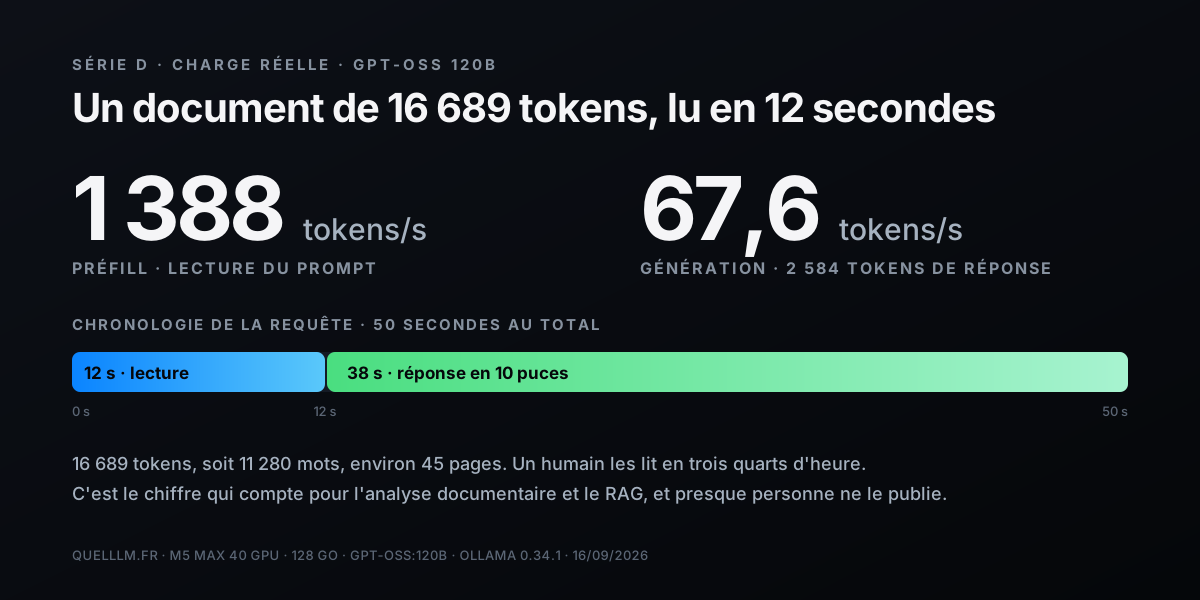
A twenty-word prompt says nothing about prefill. To measure it, Joël sent gpt-oss 120B a text of 11 280 words in a single block—16 689 tokens and about 45 pages—with a summary instruction. Result: 1 388 tokens per second while reading, meaning twelve seconds before the first response word appeared, followed by a 2 584-token summary at 67.6 tokens per second.
This is the number that matters for serious use cases. Analyzing a contract, summarizing an audit report, querying a document database with RAG: in all these cases, the model spends most of its time reading, not writing. Twelve seconds for 45 pages on a laptop, without a single byte leaving the machine—that’s what makes local AI usable for a consultant bound by professional confidentiality or a company subject to strict confidentiality requirements.
#Heat and fans
Joël recorded the thermal state after each series using macOS’s thermal stress command. The verdict was consistently “Nominal,” with no audible fan noise, including during series D, which drives the GPU at full load for fifty seconds. This is consistent with what we observe on the M4 Max, with one caveat: our measurements are bursts lasting less than a minute. The throttling test specified in the protocol—ten minutes of continuous load followed by a new measurement of series A—was not performed. We will request it during the next campaign.
#What these measurements don’t tell you
An honest benchmark lists what it does not prove. Here are the caveats, in order of importance.
- Short prompt prefills
- Two passes per model, with the second retained. But 43 to 98 prompt tokens measure only startup latency: only series D, at 16 689 tokens, provides a true reading throughput.
- No 70-billion-parameter dense model
- The 128 GB tier is also justified by 70B models at Q4 with a long context. Not measured here.
- No throttling test
- Bursts of less than a minute. Behavior over an hour of intensive RAG remains to be documented.
- No battery measurement
- The protocol requires mains power. On battery, expect significantly lower figures, as macOS throttles the chip.
- One clean Series D document for each tester
- The long text sent in Series D is not mandated by the protocol: two testers do not read the same document, which limits comparisons of prefills between machines. At Joël's suggestion, the protocol now provides a single 11,292-word reference text to download in the next section: future measurements will be comparable. The measurement on this page was taken earlier, using another document of equivalent length.
- A single machine, a single operator
- No variance measured. If you have the same configuration, your measurements are welcome; see the next section.
- Reasoning-mode models
- Models that think before answering produce far more tokens than the requested 300 words, and this length varies from one run to another for the same model (669 to 1 707 tokens on gpt-oss 120B). Total durations are therefore not comparable; only speeds are.
- Prompt caching on retries
- When the same prompt is run again, Ollama reuses the tokens it has already read (“prompt eval cached”). The prefill of an identical rerun is therefore not a measurement; to measure prefill, you need a long, new prompt, as in the D series.
#Reproduce the benchmark at home

The protocol is designed to be replayed as-is on any Mac Apple Silicon, from MacBook Air to Mac Studio. If you run the same series with the same prompt, your figures are directly comparable to those on this page.
- 01Prepare the machinePlug in the power cable, close your browser, Docker, and virtual machines. Note your chip model, GPU core count, and Ollama version.
- 02Check the system statusRecord the chip, number of GPU cores, macOS version and Ollama, power supply, available memory, and open applications. Joël wrote a zsh script that generates this report with one command; it will be added to the Mac kit’s benchmark chapter after verification, with his permission.
- 03A seriesPull gemma4:12b and qwen3.8:27b, run each with --verbose, paste the shared prompt, let the response finish, and exit with /bye. Run two passes and keep the second.
- 04Series BSame with qwen3.8:27b-mlx. Compare the eval rate line with the one for the A series.
- 05Series CIf you have 96 GB or more: gpt-oss:120b. Otherwise, choose the largest model that fits in your unified memory minus 10 GB.
- 06D SeriesDownload the QuelLLM reference text, 11,292 words, the same for everyone, and pass it to ollama run followed by the instruction “Summarize this text in 10 bullet points.” Note the displayed prompt-token count: it depends on the model, not the text.
#Who it's for, and at what price
The 128 GB M5 Max is justified for one use case: running locally models that fit nowhere else in a laptop, with room for context and a second model. gpt-oss 120B at 79 tokens per second and a 45-page document read in twelve seconds, without a fan, is an AI workstation that fits in a bag.
| You are | What this benchmark tells you | Recommended tier |
|---|---|---|
| Consultant, lawyer, or certified public accountant under professional secrecy | A 120B model reads and summarizes your files locally, at a usable speed, without sending anything outside | M5 Max 128 GB |
| Developer who wants a serious local copilot | gpt-oss 20B or Qwen 3.6 35B-A3B are more than sufficient and fit within 48 GB. Our 113 and 167 tok/s figures apply to the 40-core GPU chip: there is enough memory, but speed will be lower on a variant with lower bandwidth | M5 Max 48 or 64 GB |
| Daily user of a writing assistant | A dense 12B or a 20B MoE covers the use case; 128 GB is a luxury. There is enough memory, but the M5 Pro's is slower: expect less than our 58 and 113 tok/s | M5 Pro 48 GB |
| Team that wants a shared server | The Mac Studio M5 Max or Ultra offers the same engine with more memory and desktop cooling | Mac Studio |
If your needs stop at 30-billion-parameter models, half the memory is enough, and the price difference can fund a very good monitor. If your needs start at 100-billion-parameter models, there is no portable alternative, and this guide gives you the figures to justify that decision to whoever signs the purchase order.
#Credits and sources
The measurements on this page were taken by Joël Ramat, a cybersecurity and GRC consultant, ISO 27001 expert, and advisor and auditor specializing in AI-augmented on-premises services, as well as cofounder and chairman of Sywédgia SAS. He ran the QuelLLM protocol on his own machine on September 16, 2026, and reviewed this article before publication. The measurements remain his, and he is free to publish them separately.
- Joël Ramat on LinkedIn
- Sywédgia, cybersecurity consulting and auditing
- Our MLX versus llama.cpp guide on Mac M5
- MacBook Pro M5 Max hardware sheet
- Install gpt-oss with Ollama
Method: raw outputs from ollama run --verbose copied after each measurement, with no editing; system state recorded by script before the test run; thermal throttling read after each series. The full report, including the models’ complete responses, is retained and can be provided upon request. Written and formatted by Mohamed Meguedmi, BestLLMfor.
#FAQ
Is the 128 GB M5 Max faster than the 128 GB M4 Max for local AI?+
Why is gpt-oss 120B faster than Qwen 3.8 27B?+
Do you need 128 GB to run gpt-oss 120B?+
Do these figures hold on battery power?+
Why aren’t the prefills for series A, B, and C published?+
Can I submit my own benchmarks?+
Where can I find the preparation script used for this benchmark?+
Feedback, an error, or a clarification? Let us know—it improves the guide for everyone.